This article is written by Zach Goldie
Having maintained a CodePush fork for 18 months and served billions of updates, we decided it was time for an overhaul.
We’re big fans of CodePush, and it was a great benefit to the React Native community. But, it was written in 2015 and had some weaknesses. The biggest of these was architectural, with limitations in how update checks and release metadata could scale.
The result, Codemagic Patch, is now public and available to self-host on the codemagic-patch repository.
Why CodePush needed a rethink
Several problems motivated the rewrite.
Self-hosting was a second-class path, while App Center was the default; forks and an archived standalone filled the gap.
Update check polls the server, meaning possibly millions of daily requests for apps with lots of users.
Patches were file-level, not binary-level. Small JS changes could still mean large downloads.
Release history did not scale; one JSON file per deployment kept growing.
No built-in fingerprinting; nothing verified a bundle worked with a binary version.
These problems made getting started difficult and caused scaling issues.
What’s new in Codemagic Patch
Codemagic Patch is our new evolution, a self-hostable OTA product.
Self-hosting
Codemagic Patch makes self-hosting a first-class path, not an afterthought. Two paths, for two jobs: docker-compose.dev.yml to run the stack on your machine for local development, and scripts/selfhost/install.sh to deploy for real on a server with public domains, Let’s Encrypt, and GitHub sign-in.
CDN-first delivery
checkForUpdate() no longer polls your control-plane API. The React Native client SDK fetches a small pre-generated manifest from your download base URL (object storage by default) and decides locally what to download and install. For production, you can put a CDN such as Cloudflare in front of the storage hostname so manifests and bundle downloads are cached at the edge.
For more on why that design matters under load, see Designing scalable OTA update architecture for React Native.
Native fingerprinting
On every release, the cmpatch CLI hashes your native project and attaches that fingerprint to the bundle. Each release also targets a specific binary version (for example 1.2.3). Together, fingerprint and binary version guard against shipping a JS bundle to an incompatible native build.
Binary diffs (HDiffPatch)
Codemagic Patch patches at the binary level with HDiffPatch, not file-level diffs. That means smaller downloads and faster updates on slow connections.
Web dashboard
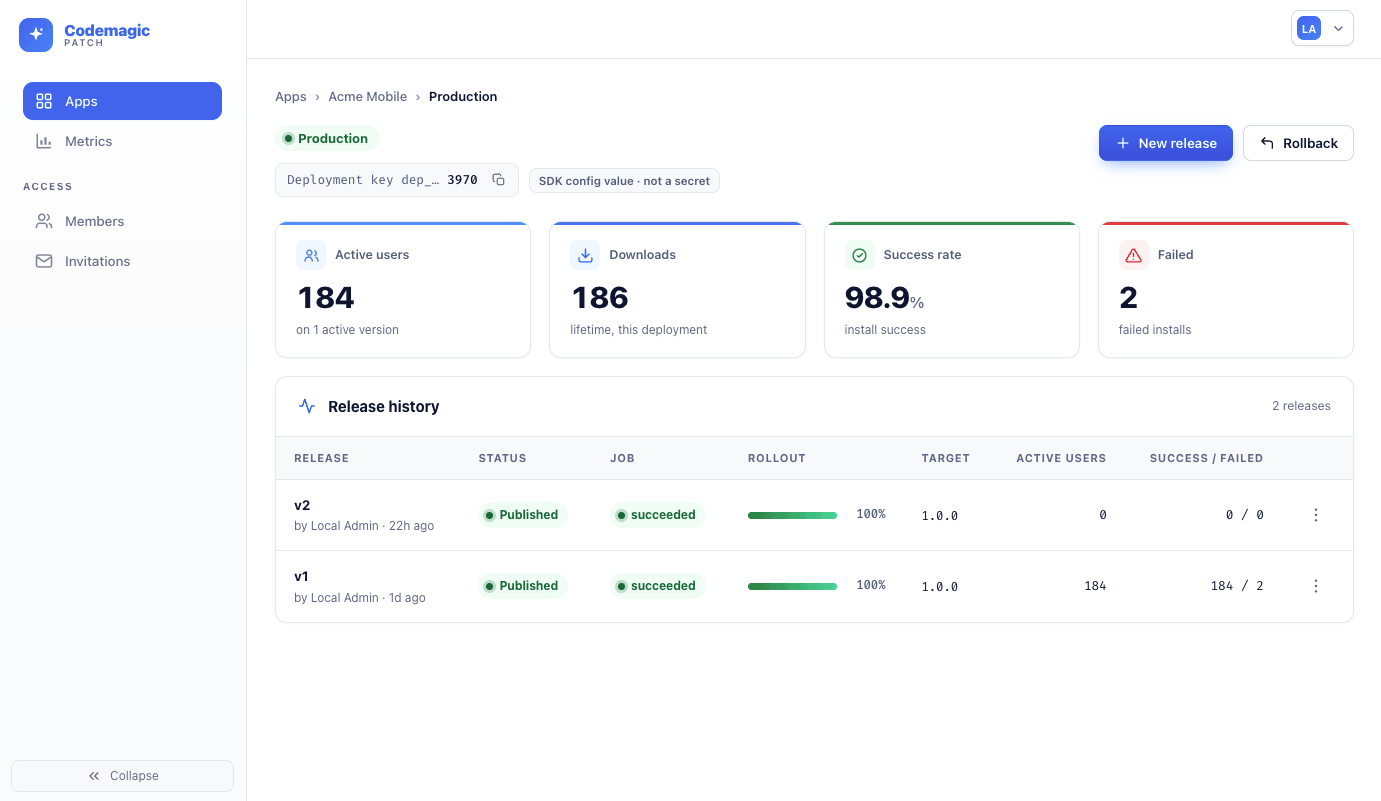
Codemagic Patch ships with a web dashboard, not just a CLI. Sign in with GitHub, manage apps, run releases and monitor rollouts all from the dashboard.
How to get started
Pick the path that matches what you are doing: a local stack on your machine, or a production deployment on a server. The codemagic-patch repository has the full guide about the client SDK, local dev, and production deploy.
On localhost
To try Codemagic Patch on your machine, use docker-compose.dev.yml. It brings up the server, dashboard, PostgreSQL, and MinIO with seeded team and app data so you can publish a test release without public domains or a GitHub OAuth app.
Server-hosted
For a production deployment on a server — public URL, Let’s Encrypt, GitHub sign-in — clone the repo and run scripts/selfhost/install.sh. Do not bring up docker-compose.selfhost.yml by hand:
git clone https://github.com/codemagic-ci-cd/codemagic-patch.git codemagic-patch
cd codemagic-patch

scripts/selfhost/install.sh \
  --api-domain updates.example.com \
  --storage-domain storage.updates.example.com \
  --email admin@example.com \
  --github-oauth-client-id Iv1.xxxxxxxxxxxxxxxx \
  --github-oauth-client-secret <github_client_secret>
The installer writes .env.selfhost with production secrets, builds the server and dashboard images, starts the Compose stack, obtains Let’s Encrypt certificates via Caddy, and prepares your team for first sign-in. You need two domains (one for the API and dashboard, one for artifact storage), a GitHub OAuth app with device flow enabled, and ports 80 and 443 reachable.
Backup, upgrade, and smoke-test scripts live alongside the installer in scripts/selfhost/. For production traffic, you can optionally put Cloudflare in front of the storage domain, point PUBLIC_BASE_URL at it, set DELIVERY_ADAPTER=cloudflare, and Patch will purge the edge cache after each publish. Storage stays S3-compatible storage (MinIO, S3, R2) or GCS.
Larger deployments (coming later)
When a single server is not enough, Codemagic Patch will add deeper managed CDN adapters (AWS CloudFront, Azure Blob, and more) and paths for larger multi-region setups without running your own VM.
Install, backup, upgrade, and the full setup guide are in the codemagic-patch repository on GitHub.
Prefer not to self-host?
We can set up Codemagic Patch as a fully managed hosted deployment for your team — the same stack, without operating object storage, CDN, or background workers yourself. Talk to sales to arrange hosted Patch.
Visit the Codemagic Patch repo
The codemagic-patch repository on GitHub has the full setup guide and everything you need to get started — server, CLI, client SDK, and self-host install scripts.