
This article is written by Marijan Kozic
Codemagic Patch ships live updates of HTML, CSS, and JavaScript to Capacitor, Ionic, and Cordova-on-Capacitor apps, without a new store binary.
Say a checkout button stops working on some Android 15 devices, and the fix turns out to be four lines of TypeScript. In a Capacitor app, those four lines live in the web layer, inside a WebView, nowhere near native code. Without over-the-air (OTA) updates, they still have to go the long way round: new binary, store submission, review, and then a slow trickle of users who eventually update. Some never do.
That’s the problem OTA updates solve, and as of today, Codemagic Patch solves it for Capacitor apps with our self-hosted tool.
Patch v0.6.0 ships with two new packages: @codemagic/capacitor-patch, the SDK that goes into your app, and @codemagic/capacitor-patch-cli, a command line made for publishing and managing Capacitor releases. They use the same server, dashboard, and delivery protocol as our React Native SDK.
Below, we’ll go through what you get with Patch, why Capacitor turned out to be the simplest framework we’ve ever built OTA support for, how you can self-host Patch, and where to find the docs to get your first release out.
Replacing Appflow’s Live Updates Before the Sunset
Ionic has announced that all Appflow features and services will be sunset on December 31, 2027, a little over a year from now. They’ll keep Appflow up to date with its dependencies until then. After that, Ionic warns that apps still depending on Appflow may hit failed builds and failed live updates, and users may end up looking at a blank white screen.
A year can feel like plenty of time. It isn’t, once you account for how an OTA migration works. Your new SDK has to ship inside a native binary. That binary has to pass review and then actually get installed by enough of your users, because every device still on the old SDK will keep asking the old service for updates. In practice, the migration build should be out months before the deadline.
We’ve been building, signing, and publishing Capacitor apps on Codemagic for years, and Ionic’s own continuity page lists us as an alternative for Appflow native builds. Capacitor teams could also already get OTA updates from our CodePush service through the community cap-codepush plugin. Patch replaces that arrangement with a first-party SDK that we design, test, and support ourselves. For a Capacitor team, that means native builds and live updates from one vendor.
What you get with Patch
A server you can run yourself, an SDK in the app, a CLI to publish the web build you already produce, and a dashboard for what happened after that.
- Web-layer fixes reach devices that already include the SDK. The check runs on launch, and you can also run it when the app returns to the foreground.
- Downloads are a diff of what changed, with a fallback to the full bundle if the diff fails.
- A bad release rolls itself back if the app never reports the new bundle as healthy.
- You choose when an update takes effect. Mandatory updates can follow a different rule.
- Releases can be signed, and the server can reject unsigned ones.
- Staging and Production stay separate. You can send a release to a percentage of devices, then promote the one that worked without rebuilding it.
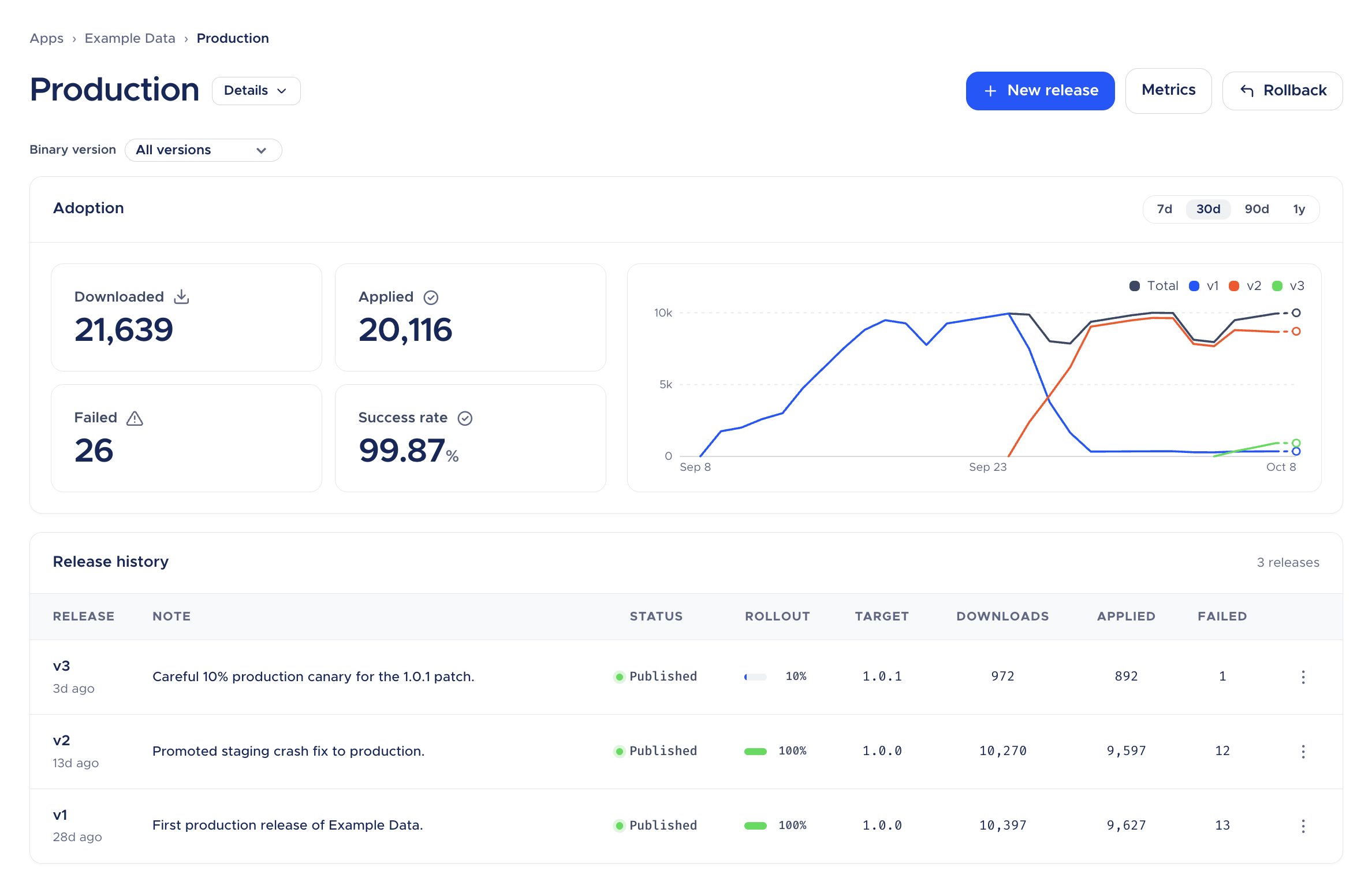
- The dashboard shows adoption, failures, and download size for each release.
Why Capacitor was the easy one
OTA for React Native is a fairly involved piece of engineering. The tooling has to deal with a bundler (Metro or Expo), Hermes bytecode, and the New Architecture, and it has to hook into both how the bundle is built and how the runtime loads it.
Capacitor has none of that. A Capacitor app is a native shell that points a WebView at a folder of web assets, and @capacitor/core already has the APIs to change which folder that is (setServerBasePath, getServerBasePath, and persistServerBasePath). An OTA update comes down to downloading a new folder, verifying it, and pointing Capacitor at it on the next launch. There’s no bundler to integrate with and no bytecode format to match.
You see the same thing in the CLI. cmpatch-capacitor doesn’t run your build and doesn’t care whether you’ve run npx cap sync. You build the way you already do (ionic build, ng build, vite build), and whatever lands in your webDir is the release. It doesn’t matter whether that’s Angular, React, Vue, or Svelte.
Fewer moving parts means fewer ways for an update to break your app, and for an update mechanism that’s the property that counts most.
Your native version number is the compatibility boundary
There’s one rule every team should understand before shipping their first Capacitor OTA release, because it’s much cheaper to learn it now than in production.
Your web bundle calls into native code: Capacitor plugins, your own native classes, native configuration. A bundle built for one native build can break on another. If your new web code calls Camera.getPhoto() and the installed binary shipped before you added @capacitor/camera, it will fail.
The Capacitor CLI doesn’t try to detect this by fingerprinting your native project. Every release instead targets one exact native app version (CFBundleShortVersionString on iOS, versionName on Android) and is only delivered to that version. Ranges and wildcards aren’t accepted. In day-to-day terms:
- Bump the native version every time anything native changes: a plugin added, removed, or upgraded, native code edited, native configuration changed.
- If one web bundle should go to several binary versions, release it once per version.
- Never ship two different native builds under the same version number. If they differ in ways your web code cares about, no OTA tool can tell them apart.
If your team already versions carefully, you’ll hardly notice this. If it doesn’t, OTA will push you into the habit, and you’ll be better off for it. The binary version filter added to the Patch dashboard’s deployment and Metrics pages in this release makes it easy to see how each version is doing.
Put together, every change goes down one of two paths:
| If the change touches… | Then… |
|---|---|
| Only the web layer | Build your web assets, publish them with cmpatch-capacitor release create against the current binary version, test on Staging, then promote to Production with a staged rollout. |
| Plugins, native code, or native config | Bump the native version, then build, sign, and publish through Codemagic. Once the new binary is through review and in users’ hands, future OTA releases target the new version. |
What OTA buys you, and what it doesn’t
OTA is easy to oversell, so it’s worth being specific.
The obvious win is speed. A web-layer fix stops taking days of review and update lag and starts reaching users within minutes of publishing, as soon as their devices check in. For a consumer app, that can be the difference between a wave of one-star reviews and nobody noticing. For a B2B or internal app, it’s the difference between an escalation and a ticket closed the same afternoon.
You also end up supporting fewer versions. With store-only updates, every version a user hasn’t bothered to update is still out there, still generating bug reports. With OTA, devices on the same binary converge on the same web bundle, so “can’t reproduce” happens a lot less.
And your two release cycles can run at their own pace. The native release train can stay as deliberate as your compliance process requires, monthly or quarterly, while the web layer ships whenever your team is ready. Staging, staged rollouts, and promotion give you a controlled route from merge to full rollout.
What OTA can’t do is ship native code, and the app stores are explicit about where that line is.
Apple’s Developer Program License Agreement, section 3.3.1(B) forbids apps from downloading executable code but allows interpreted code, which is what the JavaScript in a Capacitor WebView is. There are conditions. The downloaded code can’t change the app’s primary purpose by adding features that don’t match how the app was described and advertised. It can’t get around signing, sandboxing, or other OS security features. And it can’t turn the app into a store for other apps.
Google Play’s Device and Network Abuse policy starts from a stricter position. Apps may not update themselves outside Google Play or download executable code such as dex, JAR, or .so files from anywhere else. The policy then makes an exception for code that runs in an interpreter or virtual machine with only indirect access to Android APIs, and gives “JavaScript in a webview or browser” as its example. That code still can’t be used to break any other Play policy.
So both stores end up in the same place. Bug fixes, copy changes, UI tweaks, and incremental improvements to the app people already installed are fine. Using OTA to turn the app into something other than what was reviewed is not, and it puts your developer account at risk. Signed releases help with the security side of Apple’s conditions, and keeping your native versions disciplined keeps native changes inside reviewed binaries, where they belong.
Run Patch yourself, or let us run it
A lot of OTA services only come as a hosted product. Patch can be either.
Self-hosted
The server, release worker, and dashboard run on your infrastructure as a single Docker Compose deployment: Caddy for TLS, the Patch server, PostgreSQL, and S3-compatible object storage, with Cloudflare or CloudFront in front if you want a CDN. Your bundles, metrics, and release history stay on your network. The Capacitor SDK talks to the standard Patch server without any changes, so you set up the server once with the self-hosting guide, and cmpatch-capacitor handles everything Capacitor-specific from there.
The SDKs and CLIs are licensed under Apache 2.0. The server uses the Codemagic Server License, which is free for up to 1,000,000 monthly active devices and converts to Apache 2.0 two years after each release. The only thing you can’t do is resell Patch as a competing OTA service.
To try it before provisioning anything, run the local evaluation stack. It runs the real server, database, storage, and dashboard on your machine in Docker, and the Capacitor CLI can point straight at it:
git clone https://github.com/codemagic-ci-cd/codemagic-patch.git
cd codemagic-patch
./scripts/local-eval/up.sh

cmpatch-capacitor config set --server-url http://localhost:3000
cmpatch-capacitor login
The local server has a prefilled one-click login, so there’s no account to create.
Self-hosting makes the most sense for teams with strict data residency rules, regulated or air-gapped environments, or a preference for owning their infrastructure.
Hosted by Codemagic
A free license doesn’t make infrastructure free. Somebody has to keep the server patched, look after the database, manage TLS and the CDN, and be on call when a release goes wrong. Plenty of teams would rather put that time into their app.
Hosted Patch runs the same software on our infrastructure. The first 100,000 monthly active users are free, there are no limits on updates or bandwidth, and the rest of the pricing is on our pricing page. Larger teams can get enterprise plans, dedicated servers, and geolocated servers that keep update infrastructure and data in a specific region.
Email sales@codemagic.io to talk about it.
Getting started
The Patch documentation covers setup step by step, so this is an overview of the path from nothing to your first OTA release.
1. Decide where Patch runs. Self-host with the self-hosting guide, or talk to our team about hosted service. For a first look, the local stack above is enough.
2. Install the CLI and create one Patch app per platform. Each app comes with Staging and Production deployments, each with its own deployment key. Don’t let iOS and Android share a deployment. A release’s delivery path doesn’t include the platform, so the two would overwrite each other.
npm install -g @codemagic/capacitor-patch-cli

cmpatch-capacitor config set --server-url https://YOUR_PATCH_SERVER
cmpatch-capacitor login                                # opens the browser

cmpatch-capacitor app create --name MyApp-iOS
cmpatch-capacitor app create --name MyApp-Android
cmpatch-capacitor deployment list --app MyApp-iOS      # deployment IDs and keys
cmpatch-capacitor deployment list --app MyApp-Android
3. Add the SDK to your Capacitor project. It supports the two most recent Capacitor major versions (currently 7 and 8) and Android minSdkVersion 24 or higher.
npm install @codemagic/capacitor-patch
npx cap sync
Configuration goes in capacitor.config.ts, with one block per platform. The API URL and download base URL come from your Patch server: the self-host installer prints both, and we give them to you for hosted Patch.
// capacitor.config.ts (excerpt)
plugins: {
  CodemagicPatch: {
    ios: {
      deploymentKey: 'YOUR_IOS_DEPLOYMENT_KEY',
      apiUrl: 'https://YOUR_PATCH_API_URL',
      downloadBaseUrl: 'https://YOUR_PATCH_DOWNLOAD_BASE_URL',
    },
    android: {
      deploymentKey: 'YOUR_ANDROID_DEPLOYMENT_KEY',
      apiUrl: 'https://YOUR_PATCH_API_URL',
      downloadBaseUrl: 'https://YOUR_PATCH_DOWNLOAD_BASE_URL',
    },
  },
},
Then call start() once the app has rendered its first screen:
import { CheckFrequency, start } from '@codemagic/capacitor-patch';

// Checks on launch and on every return to the foreground.
// Calling it after the first render is what marks the bundle as healthy.
start({ checkFrequency: CheckFrequency.ON_APP_RESUME });
Where you call it matters. start() is what tells the SDK the running bundle is healthy, so call it after your UI is actually up, not early in bootstrap. That way an update that crashes during startup still gets rolled back. Two more tips: every config value can also be set as a native resource (Info.plist or strings.xml) if you inject per-environment values in CI, and npx codemagic-patch-check-config is worth adding to your native build workflow to catch a shared deployment key before it ships. The check reads JSON only, so if your config is capacitor.config.ts, run it after npx cap sync and point it at the synced copy: npx codemagic-patch-check-config android/app/src/main/assets/capacitor.config.json. The Patch docs cover native setup for Capacitor, checking for updates, install modes, and the step-by-step APIs, and the SDK reference lists everything the SDK exports. Pick Capacitor in the switcher at the top of the docs menu to see the Capacitor version of each page.
4. Publish a release to Staging from the CLI. Build the web assets the way you already do, then publish that folder once per platform. --target-binary-version has to be the native version you will ship in the next step (CFBundleShortVersionString on iOS, versionName on Android). www below is the webDir from capacitor.config.ts.
npm run build

cmpatch-capacitor release create --bundle-path www \
  --app MyApp-iOS --deployment Staging \
  --target-binary-version 1.4.0

cmpatch-capacitor release create --bundle-path www \
  --app MyApp-Android --deployment Staging \
  --target-binary-version 1.4.0
Each command publishes one platform. Install a build that includes the SDK and uses that same native version if you want to try the Staging release on a device before it goes to the stores.
5. Ship the native release, then publish Production from CI. The SDK has to be in the installed app before a device can receive an update, so this first binary is a normal store release. Build, sign, and publish it through Codemagic as usual. CI/CD for Ionic apps walks through connecting the repo and a first workflow, and the Ionic Capacitor build guide covers code signing, versioning, and publishing for both platforms.
After that, Production releases belong in CI. Create a token with cmpatch-capacitor token create, store it with your server URL and the deployment IDs from deployment list, and publish from the pipeline. The first release guide covers that workflow, including promotion and staged rollouts.
Coming from Appflow Live Updates
Most Appflow concepts carry over directly. Appflow channels become Patch deployments, and you get Staging and Production from the start. A few things work differently, and it’s better to know about them before you start:
- The SDK swap takes one native release. You can’t deliver a new OTA SDK through the old one. Plan a native release that replaces the Appflow Live Updates SDK with
@codemagic/capacitor-patch, and leave enough time for it to reach your users before December 2027. - There’s no runtime channel switching. Appflow’s
getConfig()andsetConfig()let the app change its channel at runtime. The Patch SDK doesn’t have an equivalent, because the deployment key is part of the binary’s configuration. If your beta testers currently opt into a channel from inside the app, you’ll need another approach, such as separate beta builds pointing at aBetadeployment. - Your release history stays behind. There’s no import of Appflow channels, builds, or deployment history. Your first Patch release starts the history fresh.
- Each platform gets its own key. Appflow used one channel name across platforms. Patch uses a separate app and deployment key for iOS and for Android.
- Binary versions must match exactly. If your Appflow setup relied on looser version matching, settle on a clear native versioning scheme before you switch.
None of these should stop you, but the first one decides your timeline. The Appflow migration guide walks through the swap.
If you’re already using our CodePush service with cap-codepush, nothing changes for you today. When you’re ready, the move to Patch follows the same pattern: one native release with the new SDK, then you publish with cmpatch-capacitor instead of code-push.
When Patch isn’t the right fit
We’d rather you choose the right tool than the wrong one from us, so here are the cases where Patch won’t help much.
Most of your changes are native. Plugin upgrades, Capacitor version bumps, and native features all need a reviewed binary whichever OTA service you use. For teams like that, a fast and reliable native build-and-publish setup matters more, and Codemagic handles that too.
Your beta program depends on runtime channel switching. The Patch Capacitor SDK doesn’t offer it today. Separate beta builds work, but it’s a different workflow, so think it through before migrating.
Your native versioning is a mess and you can’t fix it. Exact-version targeting will feel strict. We think strict is the safer default, because it makes the compatibility boundary visible instead of guessing at it, but it does ask for some discipline.
You’re happy on Appflow right now. You don’t have to move tomorrow. You do have to move before the end of 2027, and the native release the swap requires means you should start well before that.
Frequently asked questions
Does Capacitor have live updates built in?
No. Capacitor does not ship an updater. Codemagic Patch is a separate SDK, @codemagic/capacitor-patch, and a CLI, cmpatch-capacitor.
Can this replace Appflow Live Updates, and by when?
It can replace Appflow Live Updates for web-layer releases. Appflow shuts down on December 31, 2027, and the Patch SDK has to ship inside a native binary well before that, because devices still on the old SDK keep calling Appflow.
Can you self-host Patch, and who is hosted Patch for?
You can self-host the server for free for up to 1,000,000 monthly active devices. Hosted Patch is for companies above that, and you arrange it with us. There is no signup.
What can an update ship, and what still needs a store release?
HTML, CSS, and JavaScript in the web layer can go out over the air, targeted at one exact native version. Plugin changes, native code, and native config still need a store release with a bumped version.
Wrapping up
Capacitor is the simplest framework we’ve built OTA support for, and it now has its own Patch SDK and CLI, with binary diffs, automatic crash-loop rollback, signed releases, and staged rollouts with promotion, plus checks for the mistakes that most often turn into blank screens. You can run Patch yourself, free for up to a 1M monthly active users (MAU), or have us host it, with a free tier available for under 100k MAU. Enterprise plans offer dedicated or geolocated servers, and engineers who’ll work through your compliance requirements with you. Together with the Capacitor build, signing, and publishing support Codemagic already has, that covers the whole release process on one platform.
This is the first release of the Capacitor SDK and CLI (v0.1.0). The Patch release notes have the full changelog, and we’d love to hear how it works for you.
If Appflow’s shutdown is on your roadmap, start before it becomes urgent. Spin up the local evaluation stack this week, and put the SDK in your next native release.