



This article is written by Marijan Kozic
Every mobile engineering team hits the same wall eventually. A test starts failing — but only sometimes. You re-run the build and it passes. You merge the code. Three days later it fails again. Nobody can reproduce it locally. The test stays red for a week while three engineers waste afternoons chasing it. Then someone adds a comment that says “known flaky, ignore” and that test quietly continues blocking pipelines for the next six months.
This is not an edge case. Studies consistently show that flaky tests are one of the top sources of CI/CD pipeline disruption in software teams of all sizes. For mobile teams, the problem is compounded: mobile tests run on simulators, emulators, and real devices that add layers of timing variance, network conditions, and hardware state that purely server-side tests never have to deal with.
This post explains what flaky tests are, why they’re expensive, and how to build a systematic approach to detecting and managing them, using Codemagic as the CI/CD backbone with the right supporting tools. We’ll give you a concrete recommended setup and walk through the reasoning behind each choice, including cost trade-offs.
What is a flaky test, exactly?
A flaky test is one that produces different results — pass or fail — for the same code, without any change in the logic it is testing. Run it once: green. Run it again: red. Same commit, same dependencies, same device configuration.
The key word is non-deterministic. A deterministic test will always fail when the code is broken, and always pass when it is not. A flaky test can fail even when the code is correct, or pass even when it is broken. That second scenario is the more dangerous one, but the first is the one that kills team morale.
Common causes in mobile apps:
- Timing and async code — a UI test taps a button before an animation finishes, or an API call hasn’t returned before an assertion runs
- Shared state between tests — a test leaves data in a database, SharedPreferences, or Keychain that affects the next test
- Device and OS variance — a test written on an iPhone 14 simulator starts failing on iOS 17.4 due to a layout change or API difference
- Network dependency — tests that make real network calls fail when the test environment loses connectivity or a third-party API is slow
- Concurrency issues — race conditions in async code that only surface under certain execution orders or CPU load
- External services — push notification handlers, in-app purchase flows, or biometric prompts that can’t be controlled deterministically in a test environment
Your choice of test framework also determines how exposed you are to many of these causes. Some frameworks were specifically built to fight timing-based flakiness: Detox for React Native uses a gray-box approach that synchronises with the app’s internal state rather than relying on arbitrary timeouts; Kaspresso for Android wraps Espresso with built-in retry interceptors and “flaky safe” assertion polling; Patrol for Flutter offers a more robust interaction model than the standard integration_test package. If your team is seeing high flakiness rates, the framework itself is worth examining, not just the tests written with it.
None of these are simple bugs. They’re structural problems in how tests are written or how the test environment is configured, and they need a systematic approach to manage.
Why flaky tests are expensive (the business case)
If you are an engineer reading this, you already feel the frustration. If you’re a team lead, engineering manager, or CTO, the following numbers are for you.
Every flaky test failure costs real engineering time. When a build fails because of a flaky test, someone has to:
- Investigate whether the failure is flaky or real
- Re-run the build (waiting for another CI cycle)
- Decide whether to merge anyway or block the PR
- Log the failure somewhere for follow-up
- Repeat this every time the same flaky test strikes
At a conservative estimate of 15–20 minutes per incident, including the CI cycle wait time, a team with even five active flaky tests firing once or twice per day is spending an hour or more every day on noise that produces zero signal. Across a team of ten engineers, that adds up fast.
Flaky tests also erode trust. This is harder to quantify but arguably more damaging. When engineers see a red build and think “it’s probably just flaky again,” they start ignoring failures. That habit is how real bugs get merged. The pipeline exists to catch regressions; if people stop trusting it, it stops doing its job.
For mobile teams specifically, the cost is higher. Build times on mobile are longer than backend services. A full build-and-test cycle on iOS or Android commonly runs 15–30 minutes. A false failure doesn’t just cost investigation time — it costs the entire build cycle it took to surface the problem.
The four-layer approach to managing flaky tests
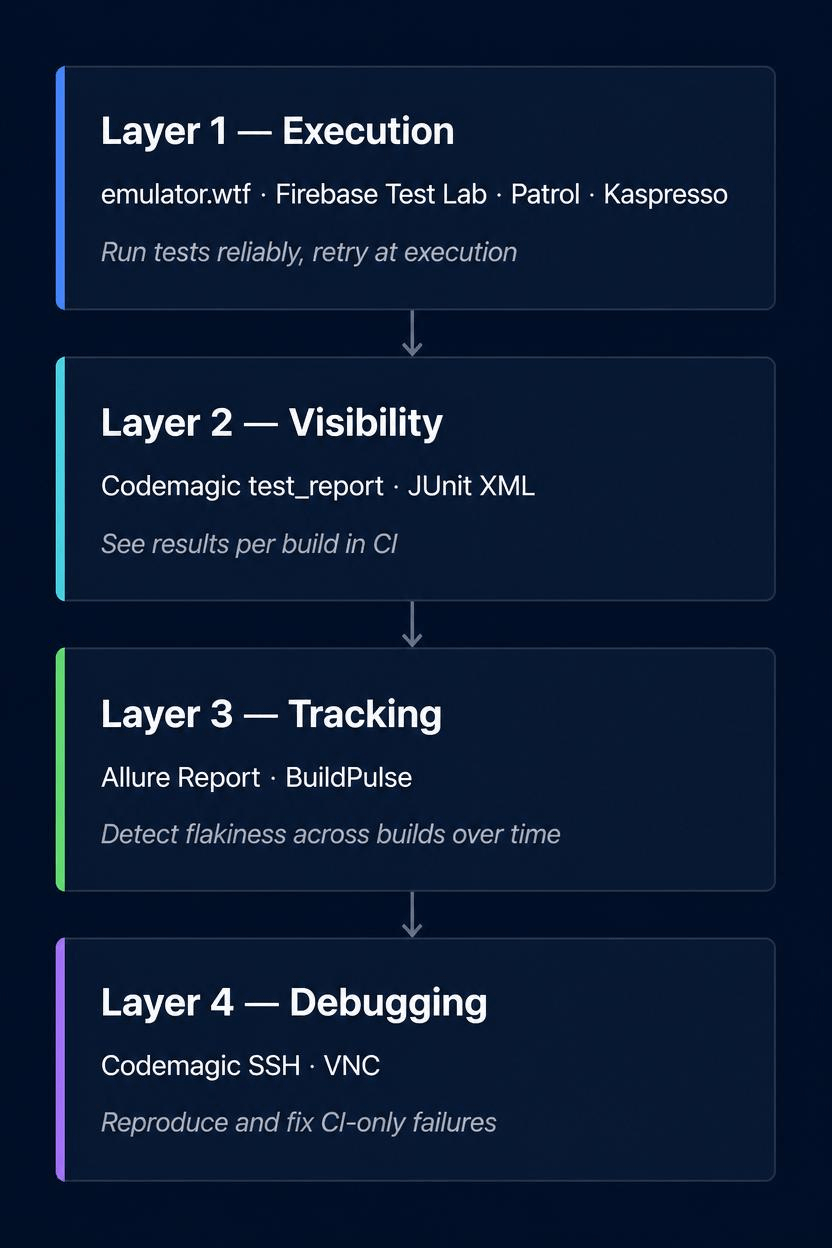
There is no single tool or technique that eliminates flaky tests. A mature mobile testing setup uses four layers, each addressing a different part of the problem.
Layer 1: Reliable test execution
Before you can identify flaky tests, your test execution environment needs to be consistent. This means:
- Running tests on the same device configurations every time (not whatever simulator happens to be available)
- Isolating tests from each other — each test starts with clean state
- Using cloud device farms for real-device tests so hardware variance is controlled
- Setting appropriate timeouts so slow network conditions produce predictable failures rather than hangs
For Android, emulator.wtf is one of the best options available. It’s purpose-built for Android CI, runs fast (container-based emulators start in seconds rather than minutes), and includes a --num-flaky-test-attempts flag that retries failing tests automatically before marking a build failed. Pricing is usage-based; contact them for current rates.
For native Android teams using Espresso, Kaspresso is worth knowing about as a complementary measure. It’s an open-source Android UI testing framework that wraps Espresso with built-in interceptors that retry individual UI interactions automatically, so flakiness is addressed at the assertion level before it ever reaches the test runner. Instead of retrying an entire test when a tap fails because an animation is still running, Kaspresso retries just that tap. This is finer-grained and often more effective than test-level retry alone. We have a dedicated blog post on Kaspresso and Allure TestOps if you want to see how this looks in practice.
For iOS, and for any tests run on real physical devices, Firebase Test Lab covers both Android and iOS. The Spark (free) plan gives you 10 virtual device runs and 5 physical device runs per day — enough for most smaller teams. Beyond that, the Blaze pay-as-you-go plan charges by the minute at affordable hourly rates.
For Flutter specifically, Patrol is a Flutter-native UI testing framework that integrates with Firebase Test Lab and supports the same retry flags for handling test instability during execution.
Layer 2: Test result visibility in CI
Every test run should produce structured output that your CI system can read and display. The standard format is JUnit XML: nearly every test framework supports it, and Codemagic can parse it natively via the test_report field in your workflow configuration.
When you point test_report at your JUnit XML output files, Codemagic shows a visual test results breakdown in the build overview: which tests passed, which failed, how long each took. This is the minimum viable observability layer. It tells you what happened in this build.
What it can’t tell you is what’s been happening across the last 50 builds. For that, you need the next layer.
Layer 3: Cross-build flakiness tracking
A flaky test’s defining characteristic is invisible if you only look at individual builds: it passes sometimes and fails other times. You need a system that watches results across many builds and flags tests that show inconsistent behaviour over time, independent of code changes.
This is where dedicated flaky test tracking services come in. They receive your JUnit XML results after every build, build a history of each test’s pass/fail record, and surface tests whose results vary without correlated code changes.
Our recommended tool for this is Allure Report (open source, free) combined with BuildPulse for teams that need cross-build tracking as a managed service.
Allure Report is an open-source HTML test reporting framework that generates rich, interactive reports from JUnit XML and other test output formats. It has built-in flaky test detection: when tests are retried (which we configure at the execution layer), Allure identifies tests where some attempts passed and some failed, and marks them as “flaky-suspicious.” It also supports categorising failures, attaching screenshots and logs, and showing step-by-step test execution detail. Allure Report is completely free and produces reports as build artifacts, with no external service or subscription required.
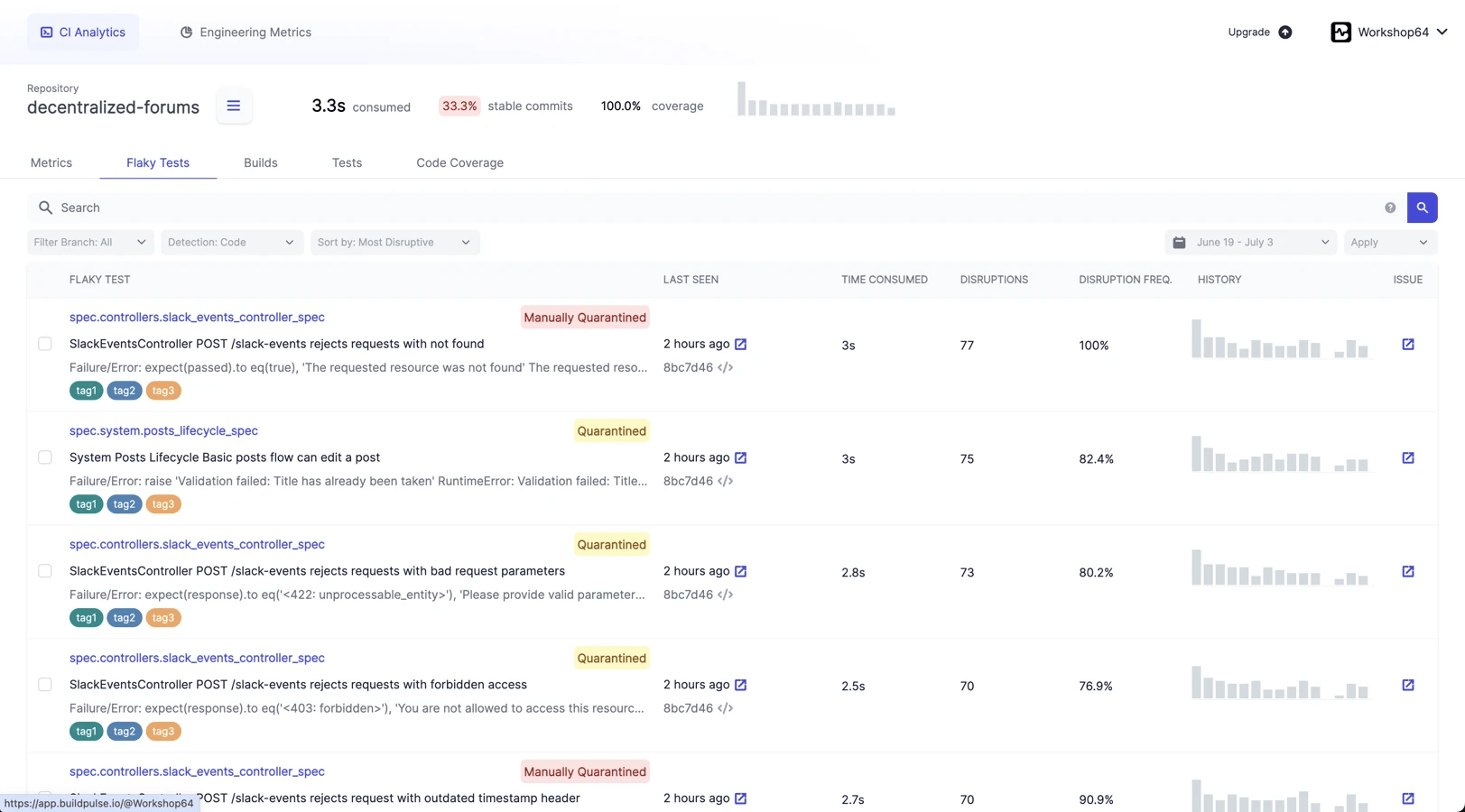
BuildPulse goes further for teams that need persistent historical tracking. It’s a SaaS platform that receives your test results via API after every build and maintains a dashboard showing flakiness trends, impact metrics, and quarantine lists across your entire history. It integrates with Jira and Linear to auto-create tickets for newly detected flaky tests, and sends weekly stability reports. There’s a free Developer plan that’s genuinely useful for smaller teams and open-source projects. Paid plans scale up from there for larger organisations — check buildpulse.io/pricing for current rates. For teams with many engineers being regularly blocked by flaky tests, the investment tends to pay for itself quickly.
Layer 4: Root cause analysis and debugging
When a test is flagged as flaky, someone eventually has to fix it. The tools that help here are different from the ones that help detect flakiness.
💡 Codemagic SSH and VNC access — underrated for flaky test debugging
Most flaky tests are impossible to reproduce locally because they depend on the CI environment: the specific emulator image, the OS version, the device resolution, or the order in which tests run. Codemagic lets you enable live remote access to the build machine for any build — no additional setup required.
With SSH access, you can drop into the running machine, re-execute the exact test command from the CI log, and observe the failure interactively. With VNC access on macOS builds, you get a live view of the simulator screen — so if a test is failing because a layout shifts at a specific screen size or an animation doesn’t complete in time, you can watch it happen rather than guessing from a stack trace.
This is not a workaround for a missing feature. It is a legitimate debugging workflow that eliminates the “works on my machine” problem entirely.
For richer failure analysis across many builds, Allure Report’s step-by-step execution view and automatic screenshot attachment on failure give you the visual context that raw stack traces lack.
The recommended stack
Given the options above, here’s the setup we recommend for most mobile teams. It prioritises effectiveness and keeps cost low:
| Problem | Tool | Cost |
|---|---|---|
| Android test execution with retry | emulator.wtf | Usage-based; contact for rates |
| Android assertion-level flakiness prevention | Kaspresso | Free, open source |
| iOS test execution with retry | Firebase Test Lab | Free tier available; pay-as-you-go above |
| Flutter native UI tests | Patrol + Firebase Test Lab | Free (Patrol is open source) |
| Test results in CI build UI | Codemagic native (test_report) | Included in Codemagic |
| Per-build visual reporting | Allure Report | Free, open source |
| Cross-build flakiness tracking | BuildPulse | Free developer plan; paid plans for larger teams |
| Live debugging on build machines | Codemagic SSH/VNC | Included in Codemagic |
This stack covers every layer without requiring paid subscriptions for smaller teams. The only tool with meaningful cost at scale is BuildPulse, and that only makes sense when the alternative — engineer time lost to flaky test investigation — costs more.

What about the alternatives?
There are other tools that address overlapping parts of this problem, and they’re worth knowing about.
Katalon TestOps provides test history, trending, and analytics. It integrates with JUnit XML output, and Codemagic has a documented integration for it. It’s a good choice for teams already using Katalon Studio for test authoring, since the TestOps reporting layer integrates seamlessly with it. For teams not already in the Katalon ecosystem, the setup overhead is harder to justify when BuildPulse and Allure Report cover the same needs.
Perfecto and LambdaTest are enterprise real-device cloud platforms with their own analytics and flaky test detection features. Both are excellent, and both have documented Codemagic integrations. They’re the right choice for large QA organisations that need thousands of device-hours per month, detailed compliance reporting, or access to a huge library of device configurations. For most product teams, they’re overkill — and priced accordingly.
ReportPortal is an open-source alternative to BuildPulse that you self-host. It offers failure clustering, historical analytics, and a dashboard similar to what BuildPulse provides. It’s genuinely powerful, but self-hosting means you own the infrastructure, backups, and upgrades. For teams with DevOps capacity, it’s worth evaluating. For teams that would rather not manage another service, BuildPulse’s hosted model wins on simplicity.
For execution-level retry specifically, Firebase Test Lab (via --num-flaky-test-attempts), emulator.wtf (same flag), and Patrol (which passes it through to Firebase) all offer the same mechanism. You don’t need all three — pick the one that matches your platform.
How this fits together in a Codemagic workflow
Codemagic is the orchestration layer that connects all of it. You don’t change the CI/CD platform. You add tools around it.
In a typical workflow:
- Tests execute on emulator.wtf (Android) or Firebase Test Lab (iOS), with retry flags set to automatically re-run failing tests once or twice before surfacing a failure
- JUnit XML results are written to a known output path and picked up by Codemagic’s
test_reportfield, which displays results in the build overview - Allure Report is generated from the same JUnit XML as a build artifact, viewable by anyone on the team, downloadable, with step-by-step detail and flaky markers on retried tests
- BuildPulse receives the JUnit XML via a short upload script at the end of the test step, adding the build to your cross-build history
- If something needs investigation, SSH or VNC access is available from the build UI to drop into the running machine
To make this concrete, here is what the relevant portion of a codemagic.yaml Android workflow looks like. This is the entire wiring for layers 1–3 — the test execution, the CI result display, and the BuildPulse upload:
workflows:
  android-test:
    name: Android Tests
    instance_type: mac_mini_m2
    environment:
      groups:
        - buildpulse_credentials # contains BUILDPULSE_ACCOUNT_ID
                                 # and BUILDPULSE_REPOSITORY_ID
    scripts:
      - name: Build debug and test APKs
        script: |
          ./gradlew assembleDebug assembleAndroidTest

      - name: Run tests on emulator.wtf with retry
        script: |
          ew-cli \
            --app app/build/outputs/apk/debug/app-debug.apk \
            --test app/build/outputs/apk/androidTest/debug/app-debug-androidTest.apk \
            --num-flaky-test-attempts 2 \
            --outputs-dir test-results
        test_report: test-results/**/*.xml

      - name: Upload results to BuildPulse
        script: |
          curl -fsSL https://buildpulse-test-reporter.s3.amazonaws.com/latest/linux/amd64/buildpulse-test-reporter \
            -o buildpulse-test-reporter && chmod +x buildpulse-test-reporter
          ./buildpulse-test-reporter submit test-results/**/*.xml \
            --account-id $BUILDPULSE_ACCOUNT_ID \
            --repository-id $BUILDPULSE_REPOSITORY_ID
    artifacts:
- test-results/**--app and --test APK paths with the actual output paths from your Gradle build. The buildpulse_credentials variable group should contain BUILDPULSE_ACCOUNT_ID and BUILDPULSE_REPOSITORY_ID, which you’ll find in your BuildPulse account settings. See the BuildPulse integration guide for the complete setup.None of this requires migrating away from your existing test framework. If your tests already produce JUnit XML — and they almost certainly do — you’re just adding a few steps around what’s already there.
Getting started: where to focus first
If your team is starting from scratch with flaky test management, the order of operations matters.
First, make sure your tests produce JUnit XML output and that Codemagic is collecting it via test_report. This gives you per-build visibility immediately, costs nothing, and is the prerequisite for everything else.
Second, add Allure Report generation to your workflow as a build artifact. This gives you rich per-build reporting with flaky markers when tests are retried.
Third, configure retry flags on your test execution (emulator.wtf or Firebase Test Lab). It’s a one-line change in your workflow YAML that stops single-occurrence flaky failures from breaking builds.
Fourth, once you have a few weeks of builds with consistent JUnit XML output, add BuildPulse. At that point you’ll have a real test history to analyse, and the flakiness dashboard becomes immediately meaningful.
Finally, treat SSH access as your debugging tool, not a crutch. Use it when a flaky test has been flagged by BuildPulse and an engineer needs to observe it in the CI environment to understand what’s happening.
A note on fixing vs. containing flaky tests
It’s tempting to treat flaky test management as a permanent coping strategy — retry everything, quarantine the bad ones, and keep shipping. That works as damage control but fails as a long-term strategy. Quarantined tests accumulate. Every test in quarantine is a test that no longer protects your users.
Quarantining is still a legitimate short-term tool, provided it’s done deliberately and not just “comment the test out and forget it.” The practical mechanism is framework-native tagging: exclude known flaky tests from your main pipeline, but keep running them on a separate scheduled build so you continue gathering data.
In Flutter, tag a test with @Tags(['flaky']) and pass --exclude-tags flaky to flutter test in your main workflow. A second workflow in your codemagic.yaml, triggered on a nightly schedule rather than every commit, runs the same suite without that exclusion flag. Your PR pipeline stays green and your engineers stay unblocked, while the nightly run continues producing JUnit XML that BuildPulse can use to track whether the flakiness is improving or not. For native Android, the equivalent is the @Ignore annotation combined with a separate Gradle test task that lifts the exclusion.
The rule is: quarantine with a ticket attached, not quarantine and forget.
It also helps to be realistic about where flakiness concentrates. Unit tests, which exercise a single function in isolation, are rarely flaky — no timing dependencies, no network calls, no device state. UI and end-to-end tests sit at the other end: they exercise the full stack including animations, networking, database state, and device behaviour, which is exactly where non-determinism hides. This isn’t an argument against UI tests — they catch real bugs that unit tests can’t. But it is an argument for writing a lot more unit tests than UI tests, and for holding UI tests to a stricter flakiness standard precisely because they’re structurally more vulnerable.
The goal of detection and tracking is to prioritise fixing. BuildPulse’s impact metrics show you which flaky tests are blocking the most builds — start there. Allure Report gives you the exact failure stack traces and screenshots needed to understand why. The tooling is not a substitute for engineering time spent improving test isolation, replacing timing-based waits with proper synchronisation, and removing shared mutable state from test suites.
Documentation and implementation guides
Full setup guides for each tool in the recommended stack:
- Testing with emulator.wtf
- Testing with Firebase Test Lab
- Patrol integration
- Katalon integration
- Allure Report integration (coming soon)
- BuildPulse integration (coming soon)
- Running tests with codemagic.yaml — full reference