Jenkins has earned its place at the center of enterprise CI/CD. For organizations building backend services, orchestrating multi-stage deployments, and managing complex polyglot pipelines, Jenkins delivers the flexibility and control that engineering teams depend on. Ripping it out isn’t a conversation most organizations want to have - nor should it be.
But mobile is different.
Building iOS and Android apps on Jenkins introduces a class of infrastructure challenges that Jenkins was never designed to solve: maintaining macOS build agents, managing Xcode version sprawl across a fleet of Mac minis, handling Apple code signing in shared environments, and keeping build machines patched and secure. These aren’t Jenkins problems - they’re mobile infrastructure problems. And they’re eating your engineering team’s time.
The better question isn’t “should we replace Jenkins?” It’s: what if Jenkins could delegate mobile builds to infrastructure purpose-built for them?
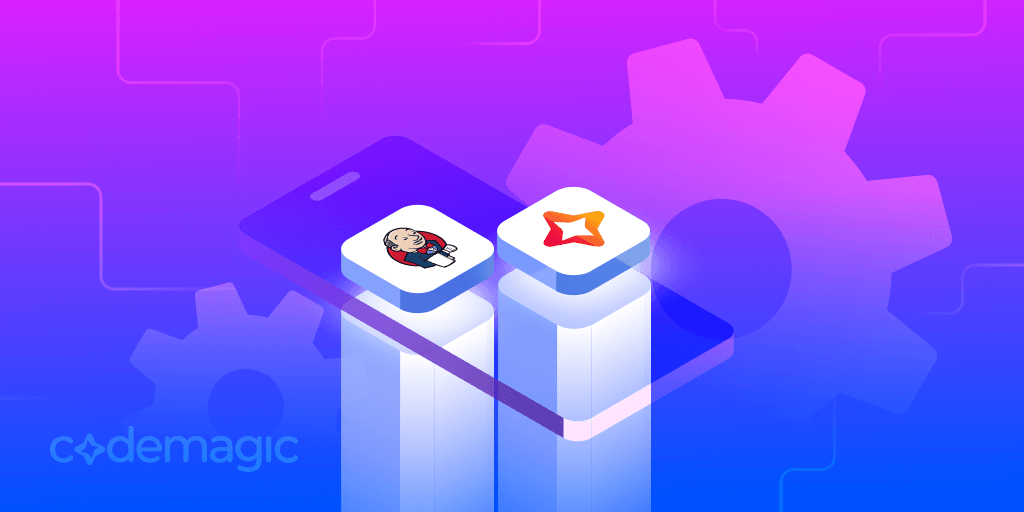
That’s the case for running Jenkins and Codemagic together. Jenkins stays as your orchestration layer - the single pane of glass for your entire CI/CD pipeline. Codemagic handles what it does best: fast, clean, fully managed mobile builds on up-to-date Apple silicon hardware. No Mac minis under desks. No Xcode update scripts. No 3 a.m. pages because a build agent’s keychain locked itself.
This article is written by Sales Engineer Ivan Kozić
The Mobile Infrastructure Problem Jenkins Can’t Solve
Jenkins is infrastructure-agnostic by design. It doesn’t ship with build machines - you bring your own. For backend services running on Linux containers, this is a strength. For mobile, it’s the root cause of a significant and ongoing operational burden.
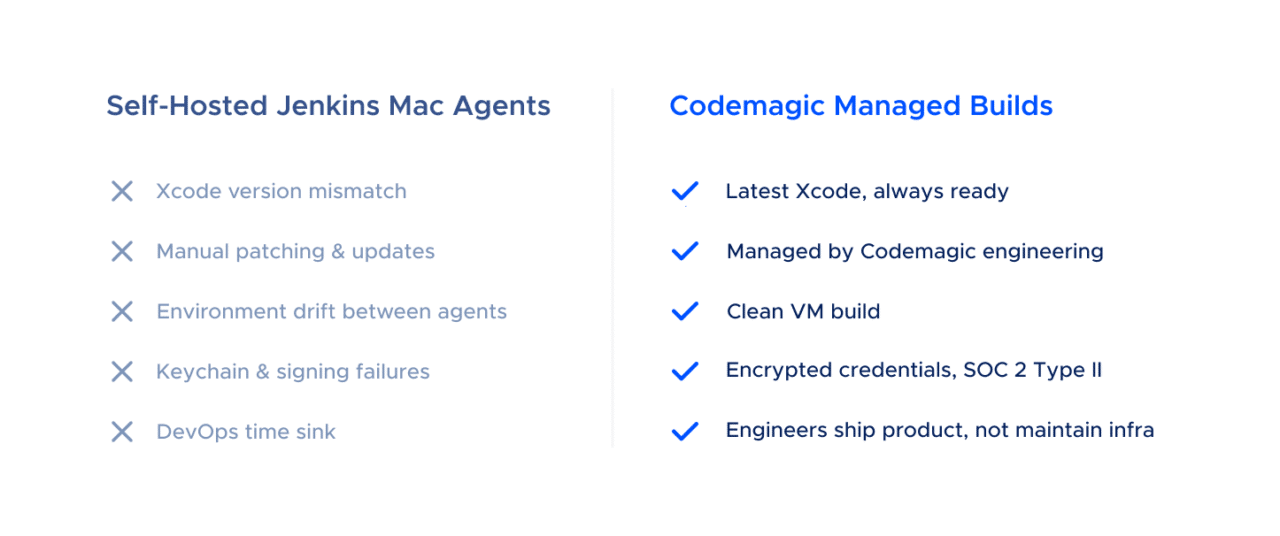
The Mac Agent Tax
Every iOS build on Jenkins requires a macOS build agent. Apple’s licensing terms require macOS to run on Apple hardware, so you’re buying Mac minis (or leasing them from a hosting provider like MacStadium or AWS EC2 Mac instances). Once you have the hardware, the real work begins:
Xcode version management is a recurring headache. Apple ships multiple Xcode releases per year, and your projects may need different versions simultaneously. On bare-metal Jenkins agents, managing parallel Xcode installations requires manual intervention - and the App Store’s unpredictable update timing means agents in the same pool can end up on different versions overnight.
Environment drift compounds the problem. Jenkins agents are long-lived by default. Over weeks and months, they accumulate state: cached CocoaPods, stale derived data, leftover provisioning profiles, orphaned simulators. This state divergence produces the most frustrating class of CI failure - builds that pass on Agent A and fail on Agent B for reasons no one can reproduce locally.
Security and patching add to the burden. macOS security updates can break keychain access for code signing. Applying patches requires careful coordination to avoid disrupting active builds. And every Mac in your fleet is another machine that needs to be inventoried, monitored, and secured to satisfy your compliance team.
Scaling means buying more hardware. Need to handle a spike in builds before a release? That’s a purchase order, a provisioning cycle, and - if you’re colocating - a physical installation. By the time the hardware arrives, the release is shipped.
None of these problems are Jenkins’s fault. They’re inherent to self-hosted macOS build infrastructure. And they represent a real, measurable cost that organizations consistently underestimate.
What a Hybrid Jenkins + Codemagic Architecture Looks Like
The integration model is straightforward: Jenkins remains your pipeline orchestrator, and Codemagic becomes your managed mobile build executor. Jenkins triggers Codemagic builds via API, and Codemagic reports results back through post-build script steps that can call into any external system - including Jenkins itself.
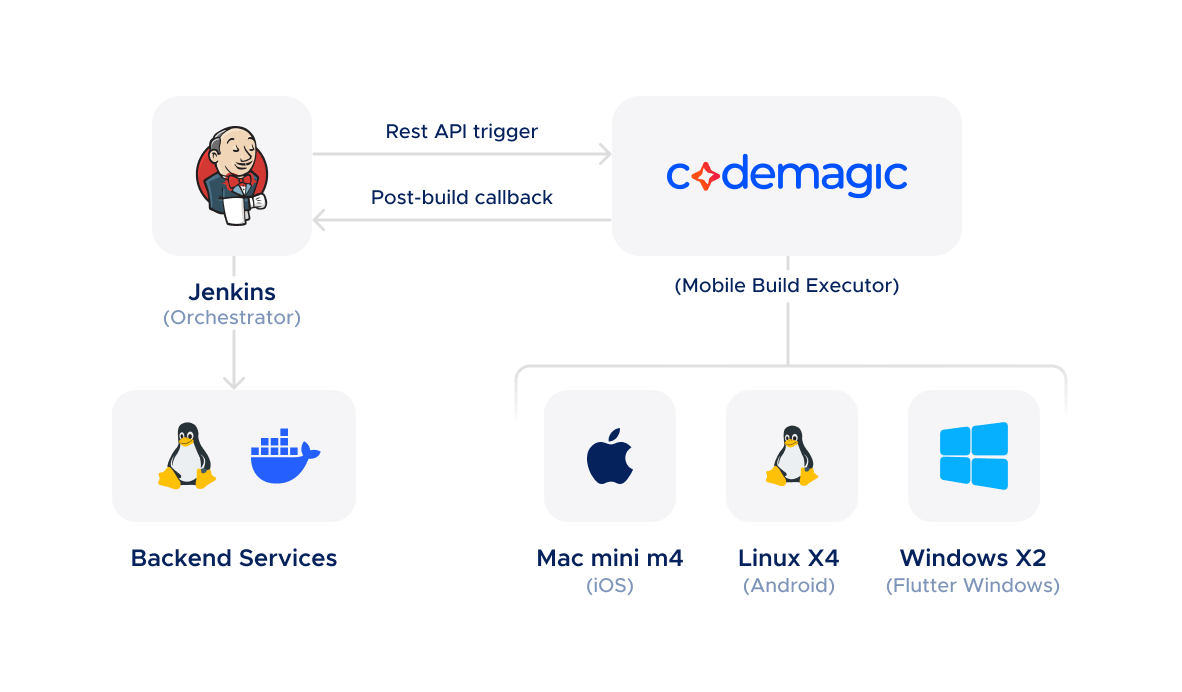
Triggering Codemagic Builds from Jenkins
Codemagic exposes a REST API (with a new v3 API currently being rolled out) that allows any external system to start builds, pass environment variables, and specify which workflow and branch to build. From a Jenkins pipeline, this is a single curl call:
// Jenkinsfile stage that delegates iOS build to Codemagic
stage('iOS Build') {
    steps {
        script {
            def response = sh(
                script: """
                    curl -s -w "\\n%{http_code}" \\
                    -H "Content-Type: application/json" \\
                    -H "x-auth-token: \${CM_API_TOKEN}" \\
                    --data '{
                        "appId": "\${CM_APP_ID}",
                        "workflowId": "ios-release",
                        "branch": "\${env.GIT_BRANCH}",
                        "environment": {
                            "variables": {
                                "BUILD_NUMBER": "\${env.BUILD_NUMBER}",
                                "TRIGGERED_BY": "jenkins"
                            }
                        }
                    }' \\
                    -X POST https://api.codemagic.io/builds
                """,
                returnStdout: true
            ).trim()
            echo "Codemagic build triggered: ${response}"
        }
    }
}
The API accepts environment variables, software version overrides (Xcode version, Flutter version), and instance type selection - giving Jenkins full control over what gets built and on what hardware.
Closing the Loop: Build Results Back to Jenkins
Codemagic’s codemagic.yaml configuration supports arbitrary shell scripts in the publishing section - scripts that run after the build completes, regardless of whether it succeeded or failed. This is the integration point for reporting results back to Jenkins:
publishing:
  scripts:
    - name: Notify Jenkins of build result
      script: |
        curl -X POST "${JENKINS_CALLBACK_URL}/buildWithParameters" \
          --user "${JENKINS_USER}:${JENKINS_API_TOKEN}" \
          --data "CM_BUILD_ID=${CM_BUILD_ID}" \
          --data "CM_BUILD_STATUS=${CM_BUILD_STATUS}" \
          --data "CM_ARTIFACT_URL=${CM_ARTIFACT_URL}"
This means Jenkins doesn’t need to poll Codemagic for status. The Codemagic build itself calls back into Jenkins with the result, artifact URLs, and any metadata your pipeline needs to continue - deploying to TestFlight, updating a Jira ticket, notifying a Slack channel, or triggering downstream jobs.
The net effect: your Jenkins pipeline looks the same as it always did. Developers see the same dashboards, the same build history, the same reporting. The only difference is that iOS builds now complete faster, on better hardware, without anyone maintaining a Mac fleet.
What Codemagic Brings to the Table
Clean Environments, Every Build
Every Codemagic build runs in a fresh, ephemeral virtual machine. The VM is provisioned from a known-good image, the source code is cloned, the build runs, artifacts are collected, and the VM is destroyed. There is no state carried over between builds - no cached dependencies from a previous run, no stale keychain entries, no leftover provisioning profiles.
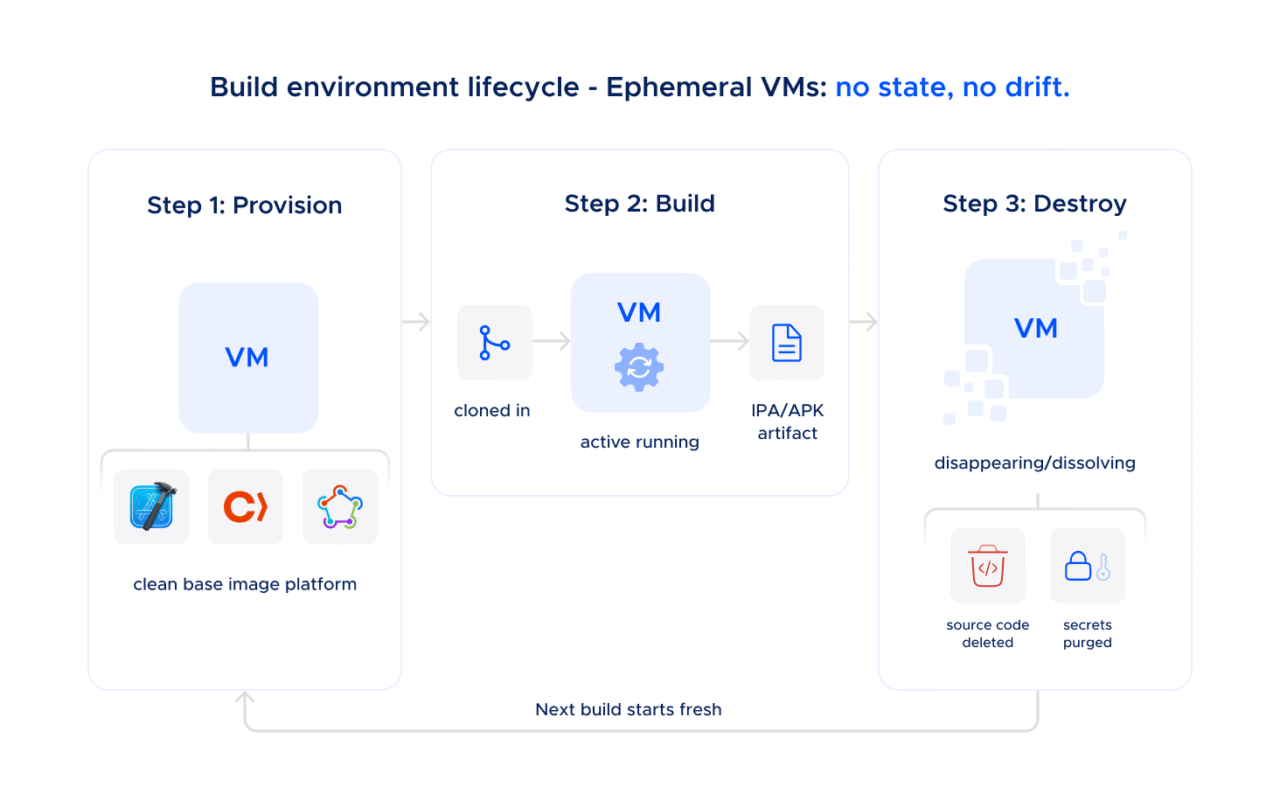
This eliminates an entire category of CI failures that Jenkins teams spend significant time debugging: the non-deterministic “works on one agent, fails on another” class of bug that stems from accumulated environment drift.
Up-to-Date Hardware Without Capital Expenditure
Codemagic provides access to current-generation Apple silicon and high-performance Linux machines:
- Mac mini M2 - The standard macOS build machine
- Mac mini M4 - More powerful macOS build machine
- Mac Studio M4 Max - For teams that need maximum compilation throughput on large iOS and macOS projects
- Linux X2 and X4 - For Android builds, Flutter Android builds, and critically for running Android emulator instrumentation tests (which require Linux, since Apple’s Virtualization Framework does not support nested virtualization on Apple silicon)
- Windows X2 - For Flutter Windows targets and cross-platform builds
For Flutter shops in particular, this is a powerful proposition: a single vendor providing macOS, Linux, and Windows build infrastructure, all accessible from the same codemagic.yaml configuration and the same API. No need to manage three separate build environments - or three separate vendor relationships.
Xcode and Toolchain Management - Solved
Codemagic’s engineering team handles Xcode updates and verifies that builds work correctly with new versions before making them generally available. The current default is Xcode 26.2, with Xcode 26.3 already available on the latest build machines. Multiple Xcode versions are installed on each machine and selectable via codemagic.yaml:
environment:
  xcode: 26.3
That’s it. No SSH-ing into agents, no xcversion scripts, no App Store roulette.
Pre-Installed Software, Ready to Go
Codemagic build machines come with the full mobile development toolchain pre-installed: Xcode, Android Studio, CocoaPods, Fastlane, Flutter, React Native dependencies, Gradle, and a comprehensive set of CLI tools and runtimes. The complete list of pre-installed software for each instance type is documented and updated with every machine image release.
On Jenkins, installing and maintaining this software across a fleet of agents is an ongoing task. On Codemagic, it’s not your problem.
Addressing the Compliance Question
Many organizations run Jenkins specifically because it’s self-hosted. The reasoning is straightforward: if the build infrastructure lives inside your network, on hardware you control, it satisfies security and compliance requirements more easily. Moving any part of that pipeline to a cloud provider naturally raises questions.
This deserves a direct answer.
Shared Pool Security: The Default
Codemagic’s standard build infrastructure is architected with security as a baseline, not an add-on:
- Ephemeral VMs: Every build runs in a fresh virtual machine that is destroyed after the build completes. Source code is never stored on Codemagic’s infrastructure.
- Encrypted networking: All data in transit is protected by SSH and TLS 1.2+ protocols.
- Encrypted credentials: Signing certificates, API keys, and other secrets are encrypted and stored in a private Google Cloud bucket that Codemagic’s backend services have no read access to. They are only accessed at build time by the build VM itself.
- Physical security: Mac infrastructure is housed in ISO 27001 certified data centers in the US (with EU data residency available on request).
- SOC 2 Type 2 certified: Codemagic received a perfect SOC 2 Type 2 report from A-Lign auditors - with no exceptions noted - covering security, availability, and confidentiality controls. The report is available on request.
- No persistent access: Codemagic employees do not have access to your source code or encrypted secrets. Build logs are retained, but only accessible to you - and to the Codemagic support team only if you explicitly share a build link.
The security posture of shared pool machines is functionally equivalent to dedicated infrastructure for the vast majority of use cases. The VMs are isolated, the data is encrypted, the environments are ephemeral, and the entire operation is independently audited.
Dedicated Machines: Checking the Compliance Box
For organizations whose procurement teams or compliance frameworks require infrastructure that is exclusively allocated to their use, Codemagic’s Enterprise plan includes dedicated machine pools:
- Dedicated VPC: A pool of Mac mini M4 or Mac Studio M4 Max hosts that run only your organization’s builds - not shared with any other customer
- Custom base images: Configure the pre-installed software to your requirements
- EU data residency: Dedicated hosts can be provisioned in EU data centers
- SSO integration: OpenID Connect, OAuth 2.0, and SAML 2.0 support for enterprise identity providers
- Procurement-friendly: NDA, DPA, vendor registration, annual invoicing via bank transfer, and availability through AWS Marketplace and Google Cloud Marketplace private offers
Codemagic’s shared infrastructure already provides strong isolation and encryption. Dedicated hosts are only used by your organization satisfying compliance auditors and procurement processes that require dedicated resources. Codemagic offers both options so that the compliance conversation doesn’t become a blocker.
The Cost Conversation: Self-Hosted Mac Fleet vs. Codemagic
The total cost of ownership for a self-hosted Jenkins Mac fleet is consistently higher than teams estimate, because the hardware is the smallest part of the expense.
A typical self-hosted setup for a team running iOS builds on Jenkins might look like this:
| Cost Item | Annual Estimate |
|---|---|
| 3× Mac mini M4 hardware (amortized over 3 years) | ~$2,000 |
| Colocation or MacStadium hosting | ~$10,800–$14,400 |
| DevOps engineer time: Xcode updates, patching, troubleshooting (estimate 8–12 hrs/month at $80/hr loaded cost) | ~$7,680–$11,520 |
| Opportunity cost of build failures due to environment drift | Hard to quantify, but real |
| Total | ~$20,480–$27,920+ |
Codemagic’s pricing is transparent and publicly available at docs.codemagic.io/billing/pricing:
| Plan | Annual Cost | What You Get |
|---|---|---|
| Mac mini M4 Annual Fixed Plan | $5,400/year | 3 concurrencies, unlimited minutes, access to Mac mini M4, higher-powered Linux X4 for Android emulator testing and Windows X2 instances |
| Mac Studio M4 Max Annual Fixed Plan | $9,000/year | 3 concurrencies on the highest-performance hardware |
| Enterprise | From $12,000/year | Dedicated hosts, SSO, custom images, NDA/DPA, procurement support |
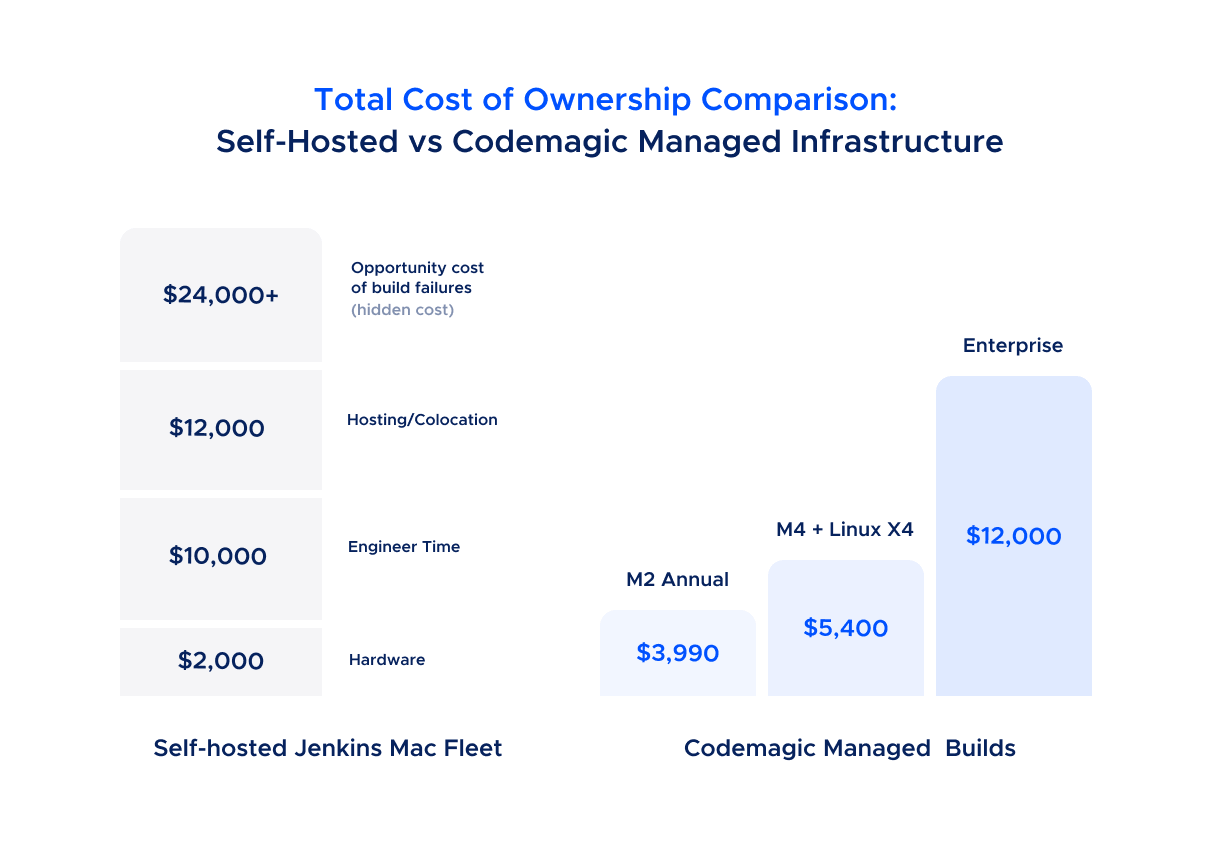
The comparison isn’t close when you factor in engineer time. Even the most conservative estimate suggests that a Codemagic annual plan costs less than the hosting alone for a self-managed fleet - and that’s before accounting for the engineering hours reclaimed from infrastructure maintenance.
For teams considering the Enterprise plan: the $12,000/year starting price includes the compliance features (SSO, NDA/DPA, dedicated hosts) that would cost significantly more to replicate in-house. For organizations where Jenkins was chosen specifically for its on-premise compliance story, Codemagic’s Enterprise tier provides equivalent - and independently audited - compliance credentials.
Pay-as-you-go pricing is also available for teams that want to evaluate the integration before committing to an annual plan.
What This Means for Your Team
Adopting Codemagic alongside Jenkins doesn’t require a migration. It doesn’t require rearchitecting your pipeline. It doesn’t require convincing your organization to abandon a tool they’ve invested years in.
It requires adding a curl call to your Jenkinsfile and a codemagic.yaml to your repository.
What you keep:
- Jenkins as your central CI/CD orchestrator
- Your existing pipeline structure, reporting, and dashboards
- Your team’s familiarity with Jenkinsfiles and pipeline-as-code
- Jenkins handling backend, infrastructure, and non-mobile builds
What you gain:
- iOS and Android builds running on current-generation Apple silicon and high-performance Linux, maintained by Codemagic’s engineering team
- Clean, ephemeral build environments with no state drift
- Xcode and toolchain updates handled for you, verified before general availability
- SOC 2 Type II audited infrastructure - with the option for dedicated machine pools if your compliance framework requires it
- Engineering hours redirected from infrastructure maintenance to shipping product
What you eliminate:
- Mac mini fleet procurement, hosting, and management
- Xcode version management across build agents
- Build agent environment drift and the debugging time it consumes
- Key-person risk tied to whoever set up and maintains the Jenkins Mac agents
Getting Started
- Create a Codemagic account and add your mobile project repository
- Define your build workflow in
codemagic.yaml- Codemagic’s documentation covers iOS, Android, Flutter, React Native, and other frameworks - Get your API token from Teams → Personal Account → Integrations → Codemagic API
- Add a Codemagic trigger stage to your Jenkinsfile that calls the Codemagic API with the appropriate app ID, workflow, and branch
- Add a post-build callback in your
codemagic.yamlpublishing section to report results back to Jenkins - Decommission your Mac agents once you’ve validated the integration in production
Codemagic offers free onboarding assistance for teams making the transition. If you’re evaluating the integration for an Enterprise deployment, contact the sales team to discuss dedicated infrastructure, compliance requirements, and volume pricing.
Jenkins handles the orchestration. Codemagic handles the mobile builds. Your engineers handle what they were hired to do: ship the product.