This article is written by Karl Suhajda
If you’ve shipped a React Native app to production, you already know the feeling. A bug surfaces. Users are reporting it. Your fix is written, tested, and ready to go. And then you wait.
Two days. Sometimes three. Occasionally five. App Store review doesn’t care that your ratings are dropping or that your support queue is filling up. It moves at its own pace, and your users experience every hour of the delay.
CodePush changed that changed that equation, bringin over-the-air (OTA) updates into the ecosystem. They let React Native teams push JavaScript changes, bug fixes, UI updates, and asset changes directly to users’ devices, no App Store submission, no Google Play review, no store download from the user.
Teams often still call this CodePush, after the original Microsoft service. Codemagic Patch is our improved version of that tooling workflow: a self-hosted OTA service, built after 18 months of maintaining a CodePush fork. This guide covers how OTA updates work, when to use them, what the boundaries are, and how to set up a production-ready Patch workflow.
What Are Over-the-Air Updates?
React Native apps have a two-layer architecture. The first layer is the native shell, the compiled iOS or Android binary that lives in the App Store or Google Play. This layer handles device hardware access, native APIs, and the core application container. Changing it requires a new binary build and a full store submission.
The second layer is the JavaScript bundle, the logic, UI components, styling, and assets that make up most of what your users actually see and interact with. This layer runs on top of the native shell, and critically, it can be updated independently.
Over-the-air updates work by replacing the JavaScript bundle on a user’s device with a newer version, delivered from an update server. When a user opens the app, it checks for an available update, downloads it in the background if one exists, and applies it, either immediately or on the next app launch, depending on your configuration.
The result: your users get the updated version of your app without visiting the App Store, without downloading a new binary, and usually without even knowing an update happened.
The Three Core Use Cases
Understanding when to reach for OTA updates is just as important as understanding how they work. There are three scenarios where teams consistently find them most valuable.
1. Production Hotfixes
This is the use case that convinces most teams to adopt OTA updates. A critical bug appears in production, a broken API call, a payment flow error, a crash on a specific device. The fix is straightforward, it touches only JavaScript, and it needs to reach users as fast as possible.
Without OTA updates, your options are limited and slow. With them, you can push the fix to a staging deployment, validate it, and begin a staged rollout to production users within hours. The bug gets patched the same day it surfaces.
2. Continuous Iteration
For product teams shipping fast, the traditional mobile release cycle is a bottleneck. You want to run an A/B test on a checkout flow. You want to change button copy based on what’s performing in analytics. You want to push a UI refinement without the overhead of a full store release.
OTA updates decouple your JavaScript iteration speed from your native release cycle. You can push changes as often as your testing and release processes support, daily if needed, without touching the App Store or Google Play.
3. Controlled Rollouts
Not every update should go to 100% of users at once. Controlled rollouts let you push an update to a percentage of your user base first, say, 5% to a beta deployment, monitor installs, error rates, and performance, and only expand the rollout when you’re confident the update is stable.
This dramatically reduces the blast radius of a bad push. If something goes wrong, you catch it at 5% rather than 100%, and you roll back before most users are affected.
Ready to add over-the-air updates to your React Native workflow?
Try Codemagic Patch locally, then deploy the same stack when you are ready.
Check out the quickstart to get up and running with Patch.
What OTA Updates Cannot Do
OTA updates are powerful, but they operate within clear boundaries and understanding those boundaries prevents both wasted effort and app store policy violations.
OTA updates cannot change:
Native modules or native dependencies. If an update requires adding or modifying native code, a new SDK that has a native layer, a change to how the app interfaces with device hardware, it requires a full binary rebuild and store submission.
App permissions. If you need to request a new device permission (camera access, location, push notifications), that’s a native change and requires a store release.
The fundamental nature of the app. Both Apple and Google’s policies are clear on this point: OTA updates must not be used to ship functionality that would materially change what the app does. The update mechanism is for improvements and fixes, not for circumventing the review process for significant new features.
Payment flow infrastructure. Specifically on iOS, changes to in-app purchase flows are subject to scrutiny and should go through the standard review process.
A practical decision rule: if the change you want to ship lives entirely in your JavaScript files and assets, it is almost certainly eligible for an OTA update. If it touches anything in your ios/ or android/ directories, it is not.
How Codemagic Patch Works
Codemagic Patch is a self-hosted OTA update service for React Native. You run the server, publish JavaScript and asset updates with the CLI or dashboard, and installed apps pull those updates through the Patch SDK.
Self-hosted, without the usual scaling tax
Classic CodePush-style servers answer every update check with a live API and database query. That is fine at small scale. At millions of users it becomes a constant flood of “am I up to date?” requests.
You publish with the CLI. The API stores the artifact and a small manifest in object storage. On launch or resume, the SDK reads that manifest from your storage domain, or a CDN in front of it, not from the API. It downloads the new bundle, or a smaller binary patch when one is available, then applies it according to your install mode. Metrics still go to the API. That is why a single VM can stay healthy even with a large user base.
You can try the full stack on your laptop, then deploy the same setup on a server. For the architecture, see Designing scalable OTA update architecture for React Native. For what it takes to run, see How to self-host OTA updates for React Native.
If you do not want to operate the stack, Codemagic can host Patch for your team. Talk to sales to arrange that.
New Architecture Support
React Native’s New Architecture, with its JSI-based communication model, TurboModules, and Fabric Renderer, is the mandatory standard from React Native 0.82 onwards. Codemagic Patch supports React Native 0.73 and above, with New Architecture support from 0.76. Teams on 0.73 to 0.75 stay on the legacy architecture.
The Analytics Dashboard
Patch ships with a web dashboard. You get release history, rollout and promote/rollback actions, and SDK-reported download, install, success, and failure metrics, plus team access. The dashboard complements the CLI; it does not replace it for CI or scripting.
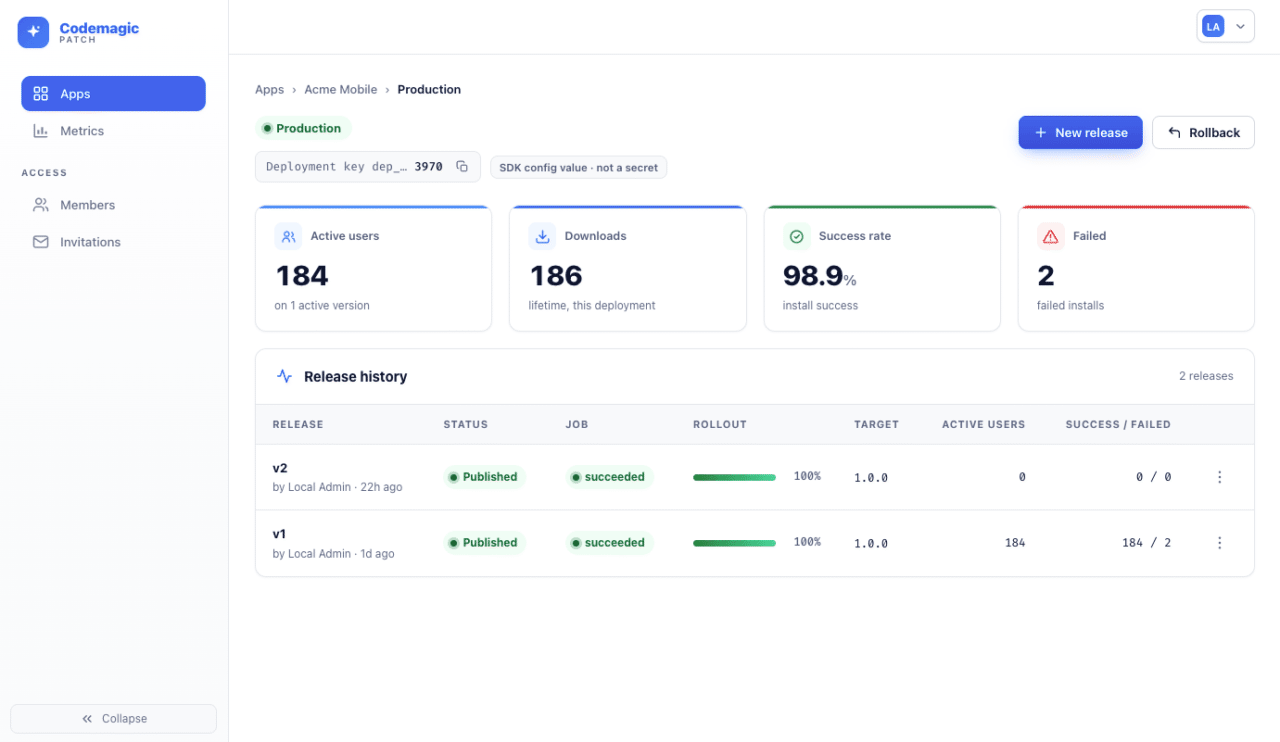
See the dashboard, CLI, and self-host install in the docs.
Read the docs → patch.codemagic.io/docs
CI/CD Integration
Patch does not require Codemagic CI. Publish with the cmpatch CLI from GitHub Actions, Bitrise, Codemagic, or your laptop. See CI integration. If you already run builds elsewhere, Patch slots into that workflow. If you want the full pipeline on Codemagic, that path is available too.
Binary diffs and native fingerprinting
When a binary patch is available, the SDK prefers that smaller patch and falls back to the full bundle if the patch fails. Each release targets a specific binary version, so only matching native builds install it. Patch also fingerprints native code: a mismatch can block publishing against the wrong native baseline, and matching fingerprints can widen a release to other binary versions that share the same native code.
Pricing
You can self-host Codemagic Patch at no charge while you stay at or below 1 million monthly active users, meaning unique devices that request an update in a calendar month. Above that, you need a commercial license from Codemagic. The React Native SDK and CLI are Apache 2.0 either way. The server uses the Codemagic Server License, source-available, with each version becoming Apache 2.0 after two years.
Commercial licenses are priced per million users per year, with a dedicated Slack channel for support. Codemagic can also host Patch for your company on request, for an additional cost.
Full rates and license terms are on the Patch pricing page.
OTA Update Best Practices
Shipping OTA updates safely at scale requires more than the technical setup. These practices apply regardless of which OTA tool you use.
Never Deploy to 100% at Once
The single most important rule in OTA deployment: always start with a staged rollout. Push to a small percentage of your production user base first, say 5% or 10% is a reasonable starting point. Monitor for installs, crashes, and error rates before expanding. Production environments surface issues that staging doesn’t, and catching a problem at 5% is dramatically less costly than catching it at 100%.
Keep Staging and Production Deployments Separate
Your staging deployment should mirror production as closely as possible, but be accessible only to your internal team. Validate every update in staging before it touches a single production user. This isn’t optional, it’s the practice that separates teams who trust their OTA workflow from teams who treat every push as a gamble.
Have Your Rollback Plan Ready Before You Need It
A rollback reverts your production user base to the previous stable bundle. You should know exactly how to trigger one before you ever need it, and you should have tested the rollback process in staging. Teams that haven’t pre-tested rollback tend to scramble when something goes wrong which is the worst possible time to be figuring it out.
Monitor Post-Deploy, Not Just Pre-Deploy
After pushing an update, watch your analytics dashboard. You want to see installs progressing steadily, error rates staying flat or improving, and version distribution shifting toward the new bundle. Any unexpected deviation from normal metrics is a signal to pause and investigate before expanding the rollout.
Document Your Process
Who has permission to push to production? What does a staged rollout look like step by step? What triggers a rollback? These should be written down and accessible to your team, not stored only in someone’s head.
Frequently Asked Questions
Are OTA updates allowed by Apple and Google?
Yes, with conditions. Both Apple’s App Store guidelines and Google Play’s policies permit OTA updates for JavaScript and asset changes, provided the updates do not materially change the app’s core functionality or purpose. The mechanism is well-established and widely used across the React Native ecosystem. The key restriction is that OTA updates should not be used to circumvent the review process for significant new features or changes that would otherwise require store approval.
What happens if an OTA update breaks the app?
A properly configured OTA setup includes automatic rollback. If a new bundle crashes before the app confirms it is healthy, the Patch SDK reverts to the last known-good bundle on the next launch. Your staged rollout process also means a bad update should be caught and rolled back before it reaches a large share of your users.
Can I use OTA updates with the React Native New Architecture?
Yes. Codemagic Patch supports React Native 0.73 and above, with New Architecture support from 0.76. Teams mid-migration should test OTA delivery in a staging environment on the new build before pushing to production.
Do my users need to do anything to receive an update?
No App Store visit is required for a JavaScript or asset update. The SDK checks on launch or resume and downloads in the background. By default the new bundle applies on the next cold start. You can change that timing in the app, including apply-on-background or immediate for mandatory fixes.
How does Codemagic Patch handle users on older versions of the app?
Each release targets a specific binary version. The SDK only installs a release that matches the running native version, so a fix for 1.2.3 does not go to users still on 1.2.2. Patch also fingerprints native code to catch incompatible publishes. Matching fingerprints can widen the same OTA to other binary versions that share that native baseline.
Getting Started
The fastest path to your first OTA update with Codemagic Patch:
- Run the local evaluation stack from the Patch docs. You get the server, dashboard, and a demo app on your machine.
- Add the Patch SDK (
@codemagic/react-native-patch) to your React Native project. See Native setup. Expo Go is not supported; you need a release-style build. - Create separate iOS and Android apps.
cmpatch app createcreates Staging and Production deployments on each. Do not reuse one deployment key across platforms. - Ship a native build that includes the SDK, then publish to Staging and confirm it installs. A store binary without the SDK will not pick up OTA updates.
- Deploy for production with the self-host installer, or talk to sales if you want Codemagic to host it.
Coming from a CodePush fork? There is a migration guide.
Summary
Over-the-air updates are not a shortcut or a workaround. They are the standard deployment model for any React Native team that ships frequently, cares about incident response time, and wants meaningful control over how updates reach their users.
The combination of same-day hotfix capability, continuous iteration speed, controlled rollout tooling, and an architecture that stays simple at scale makes OTA updates one of the highest-leverage investments a React Native team can make in their release process.
The question in 2026 is no longer whether to use OTA updates. It is which platform to entrust them to.
Stop waiting on App Store reviews for every fix. Codemagic Patch, self-hosted OTA updates for React Native. CDN-first delivery. Dashboard included.
Check out the quickstart to get up and running with Patch.