
This article is written by Karl Suhajda
Over-the-air (OTA) updates are one of the most powerful tools available to React Native teams. The ability to push changes directly to users’ devices without App Store review, without Google Play approval, without any action required from the user, meaningfully changes how fast a team can respond to bugs and iterate on their product.
But OTA updates operate within clear boundaries. Misunderstanding those boundaries leads to two distinct problems: teams either avoid OTA updates entirely because they assume the limitations are broader than they are, or they attempt to use them for changes that fall outside what the mechanism supports, which can create compliance issues with Apple and Google’s developer policies.
This post draws a clear line. By the end of it, you will know exactly which changes in your React Native codebase can go over the air and which ones still require a full store release, and you will have a decision framework for the cases that are not immediately obvious.
How React Native apps are structured and why it matters
To understand what OTA updates can and cannot do, you need a clear picture of how a React Native app is actually built.
Every React Native app has two distinct layers.
The first is the native shell, the compiled binary that is submitted to the App Store or Google Play. This layer is written in Swift or Objective-C on iOS, Kotlin or Java on Android. It handles the interface between your app and the device’s operating system: hardware access, native APIs, permissions, push notification registration, in-app purchases, and the core application container that everything else runs inside. Changing the native shell requires rebuilding the binary and submitting it for review.
The second is the JavaScript bundle, a compiled version of your React Native JavaScript and TypeScript code, along with your assets. This bundle runs inside the native shell, on top of a JavaScript engine (Hermes, in 2026). It contains your application logic, your UI components, your navigation structure, your API integration code, your styling, and most of what your users actually see and interact with.
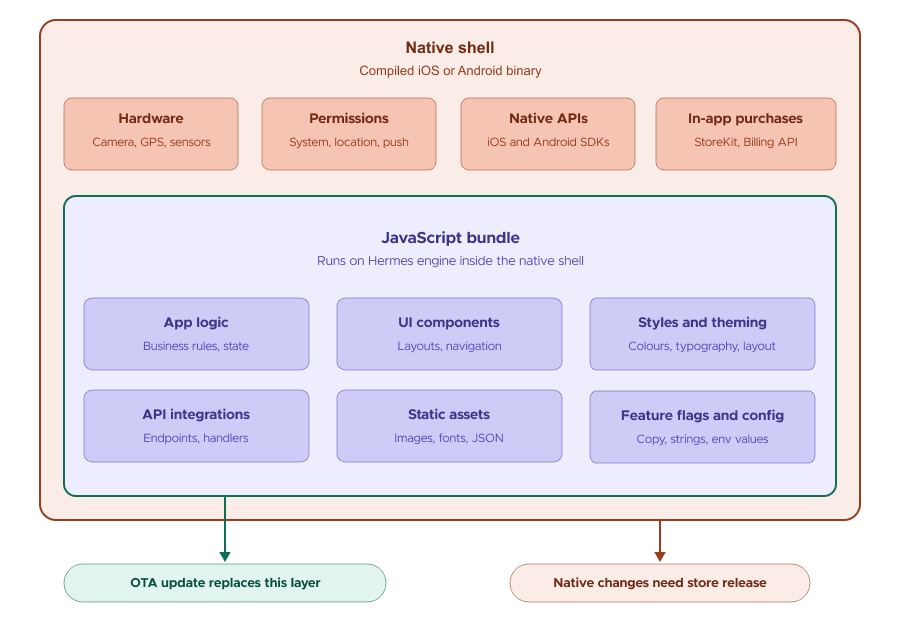
OTA updates work by replacing the JavaScript bundle on a user’s device with a newer version, delivered from a hosted update server. The native shell stays untouched. The user opens the app, the new bundle is applied, and they are running your updated code without a store submission, without a download prompt, without any awareness that an update happened.
This architecture is why OTA updates are so powerful for React Native specifically. The JavaScript layer covers a large proportion of what changes in a typical release cycle, which means a large proportion of your updates can bypass the store review process entirely.
Ready to add OTA updates to your React Native workflow?
Codemagic Patch is a self-hosted OTA service supporting React Native 0.73 and above, with New Architecture support from 0.76.
Check out the quickstart to get up and running with Patch.
What you can deploy over the air
The following categories of change live in the JavaScript bundle and are eligible for OTA deployment.
JavaScript logic and business rules Any change to how your app processes data, handles state, manages user flows, or implements business logic is deployable over the air. This is where the majority of production bugs live, which is why OTA updates are so effective for hotfixes.
UI components and layouts Changes to your React Native components, adding, removing, or modifying elements, changing layout structures, updating navigation flows, are all JavaScript-layer changes and can be pushed over the air.
Styles and theming StyleSheet changes, colour updates, typography adjustments, spacing and layout tweaks, and theme configuration are all deployable over the air.
Images, fonts, and static assets Asset files bundled with your JavaScript layer can be updated over the air. If you are replacing an image, updating an icon set, or changing a font file that ships with the bundle, that change is eligible for OTA deployment.
API endpoint changes and request handling If your app’s API integration layer needs updating, a changed endpoint, updated request headers, or modified response handling, and that code lives in your JavaScript files, it can be pushed over the air. This is particularly useful when a backend change requires a coordinated client-side update.
Configuration values and feature flags Hardcoded configuration values, feature flag states, or environment-specific settings that live in your JavaScript code can be updated over the air. This includes toggling features on or off without a store release.
Copy, content, and localisation strings Any text content managed in your JavaScript layer, UI copy, error messages, localisation strings, and notification content, is deployable over the air.
Bug fixes in any of the above categories If the root cause of a production bug is in any of the areas listed above, the fix can be shipped over the air. This covers the majority of production incidents in React Native apps.
What still requires a store release
The following categories of change touch the native shell and cannot be deployed over the air.
New native modules or native dependencies
If you are adding a library that has a native component, one that requires linking, that adds files to your ios/ or android/ directories, or that requires native build configuration, that change requires a new binary and a store submission. The JavaScript wrapper for a native module can be updated over the air; the native module itself cannot.
Changes to app permissions Requesting a new device permission, camera access, location services, push notification registration, contacts, or biometrics, is a native-layer change that must go through the store review process. This is true even if the feature that uses the permission is largely implemented in JavaScript.
Updates to native SDKs If a third-party SDK you use has a native layer, updating it requires a binary rebuild. This includes analytics SDKs, crash reporting tools, payment SDKs, and any other library that ships native code. The configuration of such SDKs, if managed in JavaScript, can often be updated over the air, but the SDK version itself cannot.
Binary-level configuration changes
Changes to your app’s bundle identifier, version number, entitlements, provisioning profiles, or build configuration are native-layer changes. So are changes to your Info.plist on iOS or AndroidManifest.xml on Android.
Anything inside your ios/ or android/ directories
As a practical rule: if the change you need to make touches any file inside your ios/ or android/ project directories, it requires a store release. OTA updates cannot modify anything in these directories.
The grey areas and how to think about them
Some changes are not immediately obvious. Here are the most common cases teams ask about.
Adding a new screen that is entirely JavaScript Eligible for OTA. If the new screen is a React Native component with no native dependencies, it lives entirely in the JavaScript bundle and can be pushed over the air. Navigation routes that point to it can be updated in the same push.
Changing how push notifications are handled Depends. The registration and permission request for push notifications is native-layer code that cannot be updated over the air. However, how your app responds to a received notification, what UI it shows, what logic it executes, and how it updates state, is JavaScript-layer code and can be updated over the air.
Updating a third-party SDK’s JavaScript configuration Usually eligible. Many SDKs that have a native layer also expose a JavaScript configuration interface. Changes to that configuration, API keys, settings, and behaviour flags, live in your JavaScript code and can typically be pushed over the air. The native SDK version itself cannot.
Updating in-app purchase products or pricing Not eligible via OTA. This is specifically restricted by Apple’s policies. Changes to your in-app purchase configuration must go through the review process.
Adding a new tab or navigation element Eligible for OTA if the implementation is JavaScript-only. If the new navigation element requires a native navigator or a native tab bar component, evaluate whether any native configuration changes are involved. Pure JavaScript navigation changes are eligible.
A change that involves both JavaScript and native files The JavaScript portion can be deployed over the air; the native portion requires a store release. In practice, this sometimes means splitting a single logical change across two deployments, an OTA push for the JavaScript side and a scheduled store release for the native side, or waiting and shipping both together in a store release if the changes are tightly coupled.
App Store and Google Play policy: what you need to know
Both Apple and Google permit OTA updates for React Native apps, with one clear condition: the updates must not materially change the fundamental nature or purpose of the app.
Apple’s App Store Review Guidelines state that apps may not use OTA mechanisms to introduce features or functionality that would not have been approved in the original review. Google Play’s policies take a similar position. The intent of both policies is to prevent developers from using OTA updates as a mechanism to bypass review for significant new functionality.
In practice, this means OTA updates are fully appropriate for bug fixes, performance improvements, UI refinements, content updates, and incremental feature changes that are consistent with the app’s established functionality. They are not appropriate for shipping entirely new features that would constitute a material change to what the app does, or for changes that would trigger a fresh review if submitted through the normal process.
The React Native community has used OTA updates at scale for years within these guidelines. Codemagic Patch is designed to operate fully within Apple and Google’s OTA update policies.
A practical decision framework
When you are considering whether a specific change can go over the air, work through these questions in order:
- Does the change touch any file in
ios/orandroid/? If yes, a store release is required for at least part of the change. - Does the change add or update a native module or native dependency? If yes, a store release is required.
- Does the change require a new app permission? If yes, a store release is required.
- Would the change materially alter the fundamental purpose of the app? If yes, a store release is appropriate regardless of the technical implementation.
- Is every changed file a
.js,.ts,.jsx,.tsx, or asset file? If yes, the change is almost certainly eligible for OTA deployment.
If you work through these questions and are still uncertain, the safest approach is to treat the change as requiring a store release. The cost of an unnecessary store submission is time. The cost of a policy violation is significantly higher.
Frequently Asked Questions
What types of changes can be deployed over the air in React Native?
Any change that lives entirely in the JavaScript bundle can be deployed over the air. This includes JavaScript logic and business rules, UI components and layouts, styles and theming, images and static assets, API endpoint changes, configuration values and feature flags, and copy or localisation strings. The practical test: if every changed file is a .js, .ts, .jsx, .tsx, or asset file, the change is almost certainly eligible for OTA deployment.
What React Native changes still require an App Store or Google Play submission?
Changes that touch the native shell require a store submission. This includes new native modules or native dependencies, changes to app permissions, updates to native SDKs, binary-level configuration changes, and anything that modifies files inside the ios/ or android/ project directories.
Can I add a new screen to a React Native app using OTA updates?
Yes, if the new screen is implemented entirely in JavaScript with no native dependencies. A new React Native component with JavaScript-only navigation can be pushed over the air. If the new screen requires a native module or native configuration changes, those portions require a store release.
Do Apple and Google allow OTA updates for React Native apps?
Yes, both Apple and Google permit OTA updates for React Native apps. The condition is that updates must not materially change the fundamental nature or purpose of the app. OTA updates are fully appropriate for bug fixes, performance improvements, UI refinements, content updates, and incremental feature changes. They are not appropriate for shipping entirely new functionality that would constitute a material change to what the app does.
Can I update push notification handling with an OTA update?
Partially. The registration and permission request for push notifications is native-layer code and cannot be updated over the air. However, how your app responds to a received notification, the UI it shows, the logic it executes, and how it updates state, is JavaScript-layer code and can be updated over the air.
Ready to deploy your next eligible change over the air?
Codemagic Patch, self-hosted OTA updates for React Native. Supports React Native 0.73+, with New Architecture from 0.76.
Check out the quickstart to get up and running with Patch.