


This article is written by Zach Goldie
If you are a React Native engineer, your job isn’t typically about maintaining infrastructure. So self hosting an over-the-air (OTA) update service can sound like a trap. Even if your Expo Update bill is hitting six figures or you’re looking for a CodePush alternative, it’s easy to assume that self-hosting is a huge time sink and not worth the effort.
That fear is understandable, but it doesn’t have to play out that way.
With Codemagic Patch, standing a server up takes about fifteen minutes, and keeping it running stays around an hour a month even for huge user bases.
What people imagine
You might guess that keeping an OTA server running in production involves lots of complex parts, such as:
- provisioning and autoscaling servers
- wiring up load balancers and Redis caching
- constant health checks and multi-step server updates
- responding to on-call when updates fail at 2am
- becoming the person who “runs OTA" for the whole company
In other words, a DevOps project with some mobile development attached.
While some OTA services are less tidy than others, running Patch is far more minimal and hands-off than the above list.
What you actually stand up
Patch’s supported path is Docker Compose on one Linux host. On a small Linux machine with Docker (2 GB RAM is enough), you run:
cmpatch selfhost install
The wizard asks for a domain, then walks the rest:
- prints the two DNS records to add and waits until they resolve
- opens a pre-filled GitHub OAuth form so you can save the app
- opens a pre-filled Cloudflare form for the storage-domain cache rules
- builds and starts Postgres, MinIO, the API server, and TLS, then hands you the dashboard URL
Your part is mostly answering a few questions and clicking Save on forms it already filled in. The stack pieces come up connected for you.
In this recording, a full install finishes in about 15 minutes of real time. The install guide has the same path in writing if you prefer to follow along that way.
There is also a local evaluation stack you can run on your machine to get a feel for Patch without even touching a server.
Avoiding scaling headaches
The time sink people worry about is rarely a working release. It is the bad week when traffic spikes and you are debugging Redis, autoscaling, and cache invalidation instead of doing mobile development.
Codemagic Patch is specifically designed to avoid that class of scaling headache.
When someone opens your app, it will usually send a request to ask if it’s on the latest bundle version. With most other tools, this is a request to the server that then makes a few database queries.
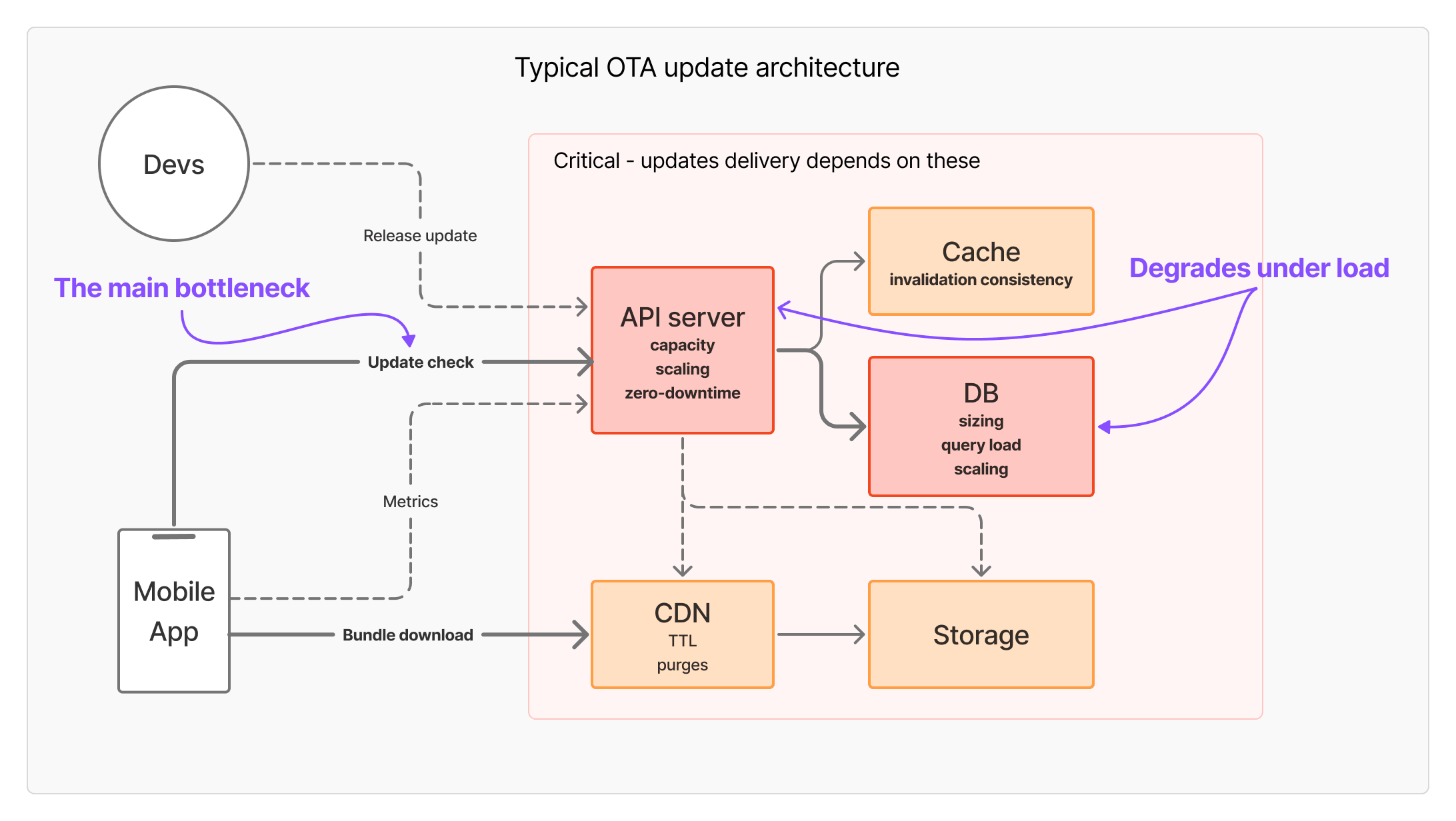
For apps with millions of users, self-hosting with services such as CodePush forks means adding extra infrastructure to stop the API and database from struggling with this load. You can end up lost in response caching with Redis and autoscaling servers.
Patch was redesigned to avoid this bottleneck, based on our experience running billions of update check requests.
Instead, each time you do a release, a small manifest.json is created saying what bundle each binary version should have. These manifests are stored on the CDN, so your machine never gets slammed with thousands of requests per second.
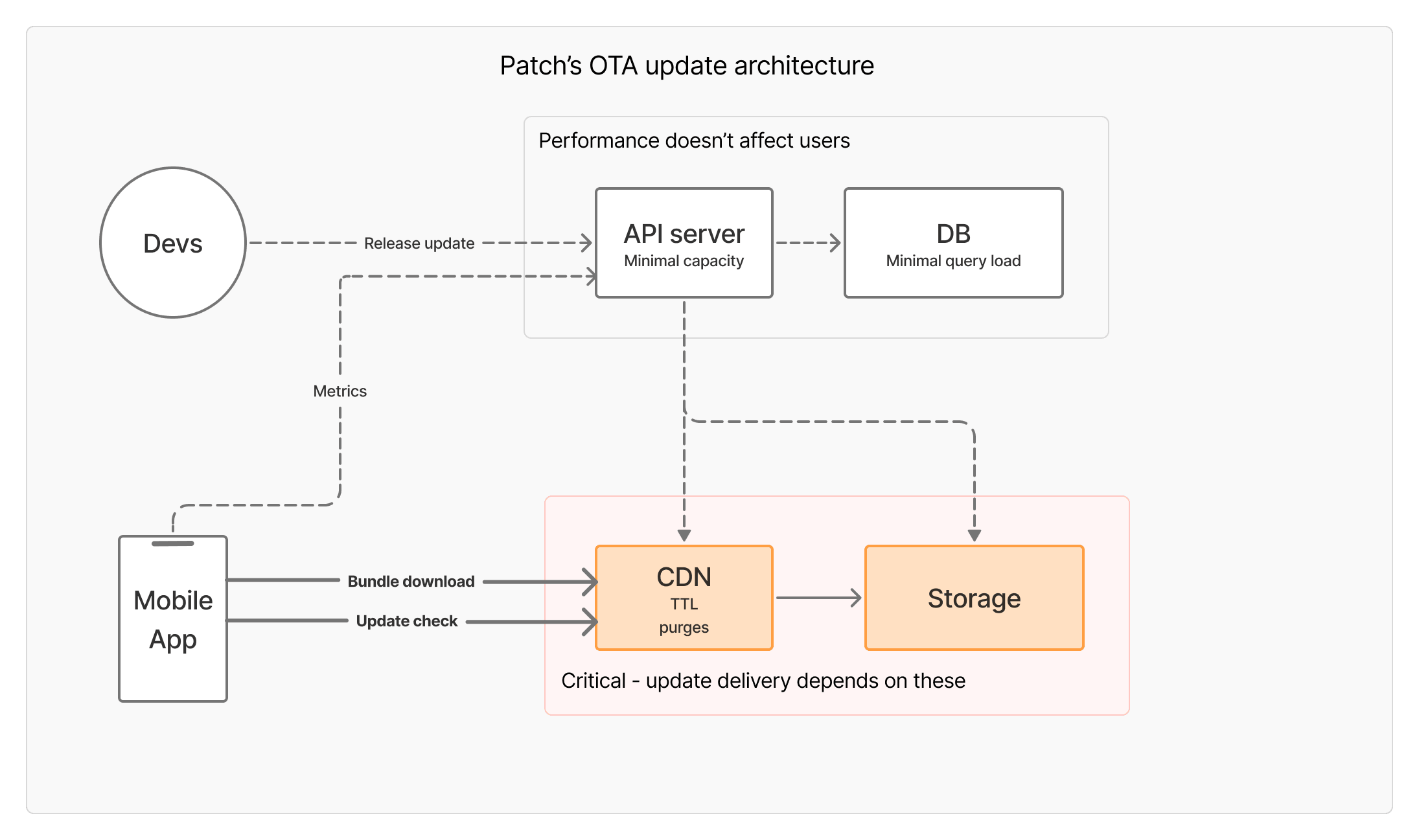
It’s like posting information on a bulletin board, instead of running a call center, which means the infrastructure can stay minimal regardless of the number of users.
Your machine uploads releases and collects metrics; devices read manifests from the CDN. That avoids the scaling failures that tend to turn into multi-day server debugging.
What it costs
You do not need a cluster and a dozen components. A $10-30/month VM is fine, including for a large user base, because devices read manifests from the CDN rather than hitting the API.
Postgres can run on that same machine. If you would rather not operate the database yourself, a managed Postgres instance adds a small amount on top.
CDN is a free Cloudflare account. All together, you’re looking at around $50/month for a production-level setup. That figure is the small deployment. At 100 million monthly users the license becomes most of the bill, which How Much It Costs to Self-Host OTA Updates for 100 Million Users works through.
Keeping the infrastructure running
Once Patch is up, the Status page in your dashboard gives you a quick check that the pieces are running, that the disk still has headroom, and that your install is up to date.
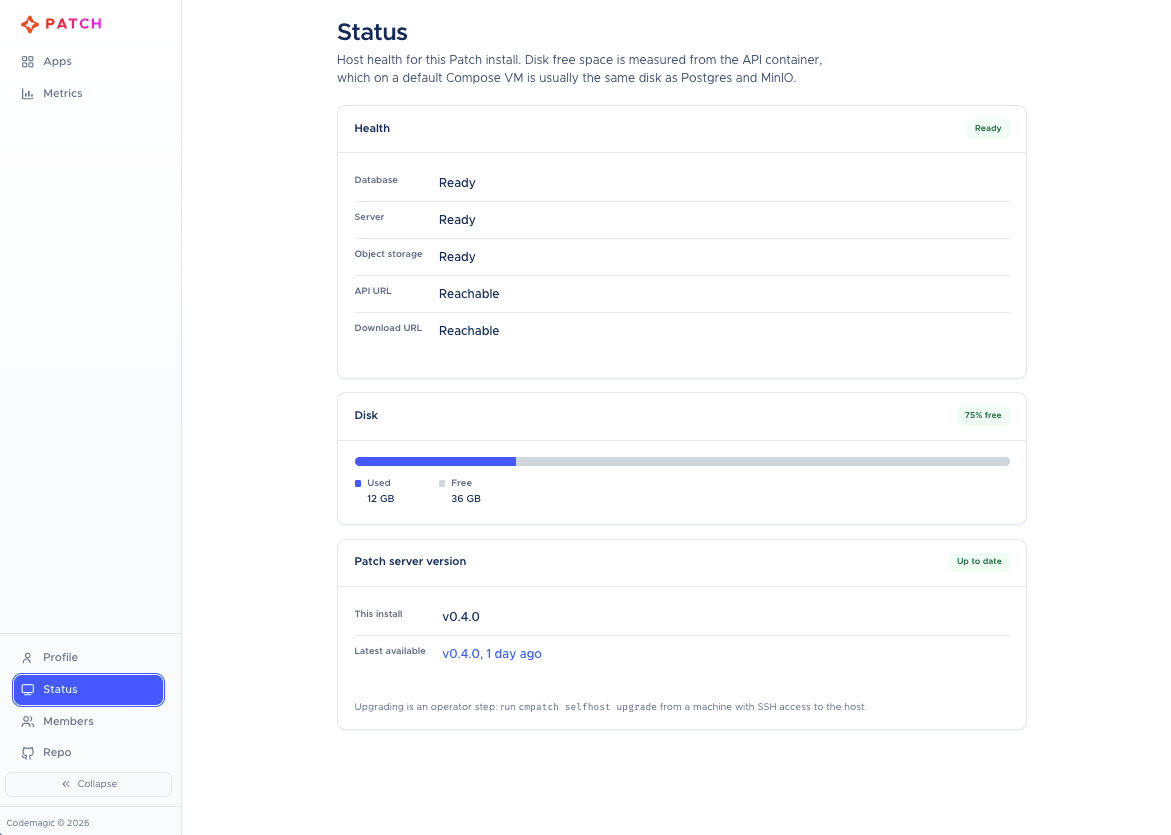
Beyond that glance, ongoing care is mostly a few occasional tasks:
backup.shon a schedule you trust, with copies stored off the hostupgrade.shwhen a new Patch release ships; it handles the backup step for you- Linux OS updates when your provider or distro prompts you
See Ongoing maintenance and Operations for the command references.
Self-hosting risk assessment
The last aspect to consider is the impact if the server does go down.
Fundamentally, the app will still keep working for users. They won’t even notice something has gone wrong.
With manifests and bundles on the CDN, devices will still be able to discover and install the latest release, even if your server goes down.
The only real risk is wanting to release an OTA update and being unable to, because the service isn’t working. That isn’t ideal, but it won’t bring in an influx of one-star reviews.
When something does go wrong, it is usually a host problem (disk, DNS, a bad upgrade), not a day spent debugging a custom platform. With off-box backups, restore.sh and a fresh install are the recovery path.
The hour-a-month tally
Put together, the work looks like this.
First-time setup, once you have a machine available:
- Get a Linux machine ready: about 5 minutes
cmpatch selfhost install(DNS, OAuth, Cloudflare, build, and TLS): about 15-30 minutes
That is usually well under an hour end-to-end.
To keep the service running:
- A quick glance at the Status page: a few minutes
- OS updates when needed: about 15–20 minutes
- Off-box backup with
backup.sh: about 10–15 minutes upgrade.shwhen a Patch release drops: about 15–30 minutes
A quiet month stays well under an hour. A month with an upgrade still fits without turning into a DevOps project, regardless of how many users you’re serving.
Patch is maintained by Codemagic’s product team, not a side project you are left to interpret alone. If install or self-hosting throws something unexpected, Discord and GitHub issues reach the people building the server and docs.
So if you’ve ever wanted to avoid the huge bills of a hosted OTA service, but were uncertain about the burden of self-hosting, go ahead and give Patch a try.
FAQ
How do I self-host OTA updates for React Native?
Use Codemagic Patch. Install the CLI, then run the installer:
npm install -g @codemagic/patch-cli
cmpatch selfhost install
A $15-30/month VM and a free Cloudflare account are enough for a large user base. Keeping it running stays around an hour a month.