Written by Marijan Kozic
GitHub Actions is one of the best CI/CD platforms available today. For web apps, backend services, and infrastructure automation, it’s hard to beat. Deep GitHub integration, a massive marketplace of community actions, flexible YAML-based workflows, and a pricing model that’s generous for open-source projects. There’s a reason it dominates.
But if you’re building mobile apps, especially for iOS, GitHub Actions starts to fight back.
Not because it’s a bad tool. Because it’s a general-purpose tool being asked to do a very specialized job. And the gap between “technically possible” and “actually pleasant” is where mobile developers lose hours, days, and sometimes their sanity.
This post breaks down exactly where that gap lives, what it costs your team, and why a purpose-built mobile CI/CD platform like Codemagic eliminates most of these problems by design.
A quick disclaimer before we start
We’re Codemagic, so obviously we have a perspective here. But we’ve tried to be fair. Everything in this post is backed by public developer experiences, documented GitHub issues, community discussions, and reproducible benchmarks with open build logs. Where GitHub Actions does well, we’ll say so. Where third-party tools like Fastlane match and alternative runners help, we’ll acknowledge that too.
Our argument isn’t that you can’t build mobile apps with GitHub Actions. Thousands of teams do. Our argument is that you shouldn’t have to work this hard.
The core problem: assembly required
GitHub Actions gives you building blocks. For a Node.js API, those blocks snap together quickly: checkout, install, test, deploy. Four steps, maybe twenty lines of YAML, and you’re shipping.
For an iOS app, those same building blocks need to be assembled into something far more involved. Let’s walk through what a real iOS CI/CD pipeline on GitHub Actions actually requires.
Step 1: The YAML workflow
You start with a workflow file in .github/workflows/. So far, nothing unusual. You specify runs-on: macos-latest, pick your trigger events, and check out the code.
Then the mobile-specific complexity begins.
Step 2: Xcode version management
Your project likely depends on a specific Xcode version. You have a few options here. You can pin the macOS runner image version (e.g. runs-on: macos-15 instead of macos-latest) to control which Xcode versions are available. You can switch the active Xcode using sudo xcode-select -switch directly in your workflow. Or you can use the popular maxim-lobanov/setup-xcode action, which wraps this in a convenient interface.
None of this is particularly difficult. The real friction comes from GitHub’s Xcode support policy. Due to disk space constraints on the runner images, GitHub only keeps a limited set of Xcode versions and simulator runtimes available at any time. When new versions arrive, older ones get removed. This means your pinned version can disappear from the image after an update, breaking your workflow until you adjust.
A concrete example from December 2025: Xcode 26.2 was only available on macos-26 runners because the macos-15 images didn’t have enough disk space to include it alongside older versions. If your project needed Xcode 26.2, you had no choice but to switch runner images. This kind of version churn is a routine maintenance burden for iOS teams on GitHub Actions.
For comparison, Codemagic maintains a wider range of Xcode versions across its macOS fleet. In your codemagic.yaml, selecting a version is a single line of configuration rather than a multi-step workaround.
Step 3: Code signing, where things get painful
This is where mobile CI/CD diverges most dramatically from anything in the web or backend world.
To distribute an iOS app (even to TestFlight for internal testing) you need a valid signing certificate and a matching provisioning profile. On your local Mac, Xcode handles this semi-automatically. On a headless CI runner, there’s no GUI, no Keychain Access app, and no Xcode automatic signing support.
GitHub Actions does not support Xcode’s automatic code signing. This has been the case since Actions launched, and it remains the single most impactful limitation for iOS developers. You have two paths forward: manual certificate management, or Fastlane match.
The manual path is documented in GitHub’s own guide and requires you to:
- Export your distribution certificate as a
.p12file - Base64-encode it (because GitHub Secrets only accepts strings)
- Store it as a repository secret alongside the certificate password
- Do the same for your provisioning profile
- Do the same for your App Store Connect API key (issuer ID, key ID, and the
.p8private key) - Create an
ExportOptions.plistfile (also base64-encoded as a secret) - Write shell commands in your YAML to
- decode everything from base64,
- create a temporary keychain,
- unlock it,
- import the certificate,
- set key partition lists so
codesigncan access it, - and copy the provisioning profile to the correct directory
That’s 5-8 secrets for a single app target. GitHub enforces a hard limit of 100 repository secrets. For a standard single-app project, that’s plenty. But if you’re doing white-label builds with 15-20 branded variants, each requiring its own bundle ID, certificate, and provisioning profile, you can burn through that limit fast. At that point you need to restructure your secrets management (encrypted files in the repo, decrypted at build time with GPG) or split across organization-level secrets. More moving parts on top of an already complex setup.
If you skip the set-key-partition-list step in your keychain setup, codesign silently fails. If you forget to set the keychain timeout, long builds fail mid-signing. If your provisioning profile doesn’t exactly match your bundle identifier and certificate, you get a cryptic Xcode error that can take hours to diagnose.
The Fastlane match path is better, but still complex.
Fastlane match is genuinely useful. It centralizes certificate and profile management in a private Git repository (or S3/Google Cloud Storage), encrypts them, and provides a clean interface for fetching and installing them in CI. If you’re using GitHub Actions for iOS, match is the right choice over manual management.
But match introduces its own setup overhead:
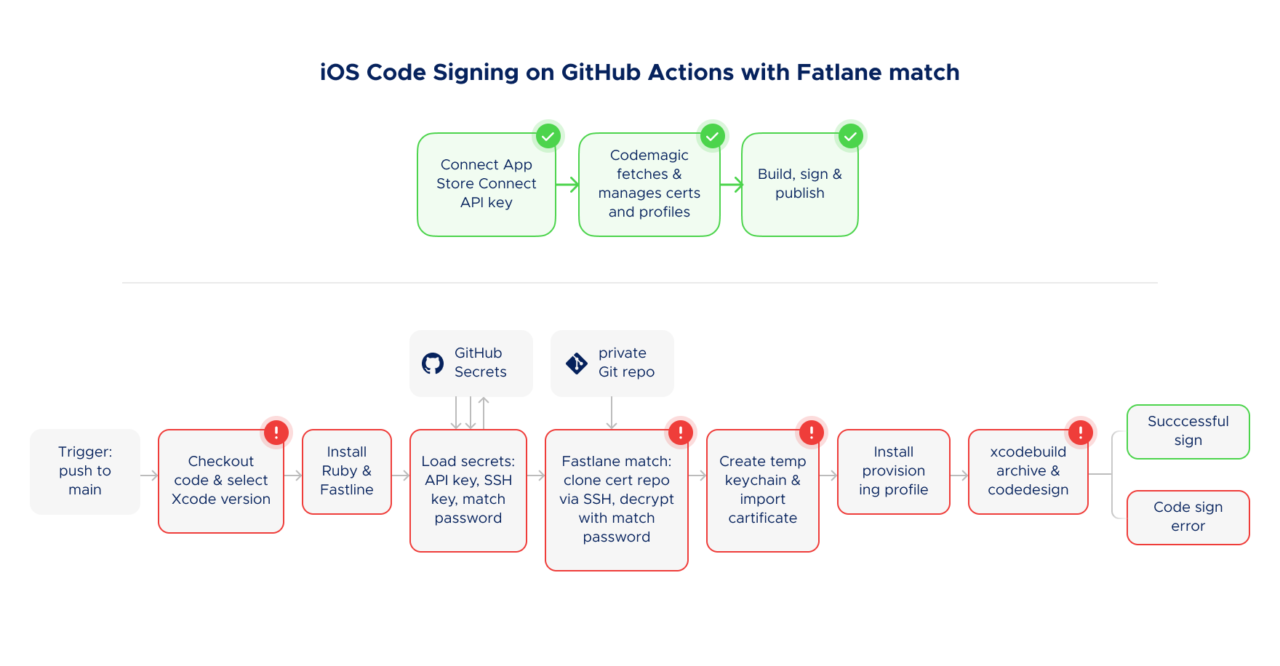
You need a separate private Git repository just for certificates. You need to configure access from your CI runner to that repo. Fastlane’s own docs note the catch: “Usually you’d just add your CI’s public ssh key as a deploy key to your match repo, but since your CI will already likely be using its public SSH key to access the codebase repo, you won’t be able to do that. Some repo hosts might allow you to use the same deploy key for different repos, but GitHub will not.” So you often end up creating a separate machine user account with read-only access. You also need a MATCH_PASSWORD for encryption, a temporary keychain (via Fastlane’s setup_ci), an App Store Connect API key configured separately, and several config files committed to your repo: Matchfile, Fastfile, Gemfile, often an Appfile.
When match works, it’s solid. When it doesn’t, you’re debugging across three systems at once: Fastlane, GitHub Actions, and Apple’s code signing infrastructure. The Fastlane community forums tell the story. One discussion thread shows a team spending days on a provisioning profile error where Xcode kept requesting a Development profile despite the Matchfile specifying appstore. Another developer described spending three full days debugging before getting TestFlight uploads working, and warned about session expiration issues and an error caused by placing match in the wrong section of the Gemfile that cost an entire day to track down.
💡 Tired of debugging code signing? Connect your App Store Connect API key to Codemagic and skip the certificate juggling.
Try Codemagic free
Step 4: Building and archiving
With signing configured, you need to build and archive your app. For native iOS projects, this typically means writing raw xcodebuild commands in your YAML, since GitHub provides no built-in iOS build action. There’s no local testability for this either. Typos and configuration errors are discovered only after pushing, waiting for the runner, and reading logs.
If you’re using a cross-platform framework, the story is somewhat better. Flutter’s flutter build ipa and React Native’s Fastlane integration abstract away the xcodebuild invocations. But these commands still depend on all the signing and runner infrastructure described above. The build command is simpler; everything around it isn’t.
Step 5: Publishing to stores
GitHub Actions has no built-in App Store or Google Play publishing support. You’ll use either Fastlane’s upload_to_testflight / deliver actions, or community-maintained actions like apple-actions/upload-testflight-build (which GitHub explicitly labels as “not certified by GitHub”). Each requires its own configuration and credentials.
The total picture
Add it up. A complete iOS CI/CD pipeline on GitHub Actions typically involves:
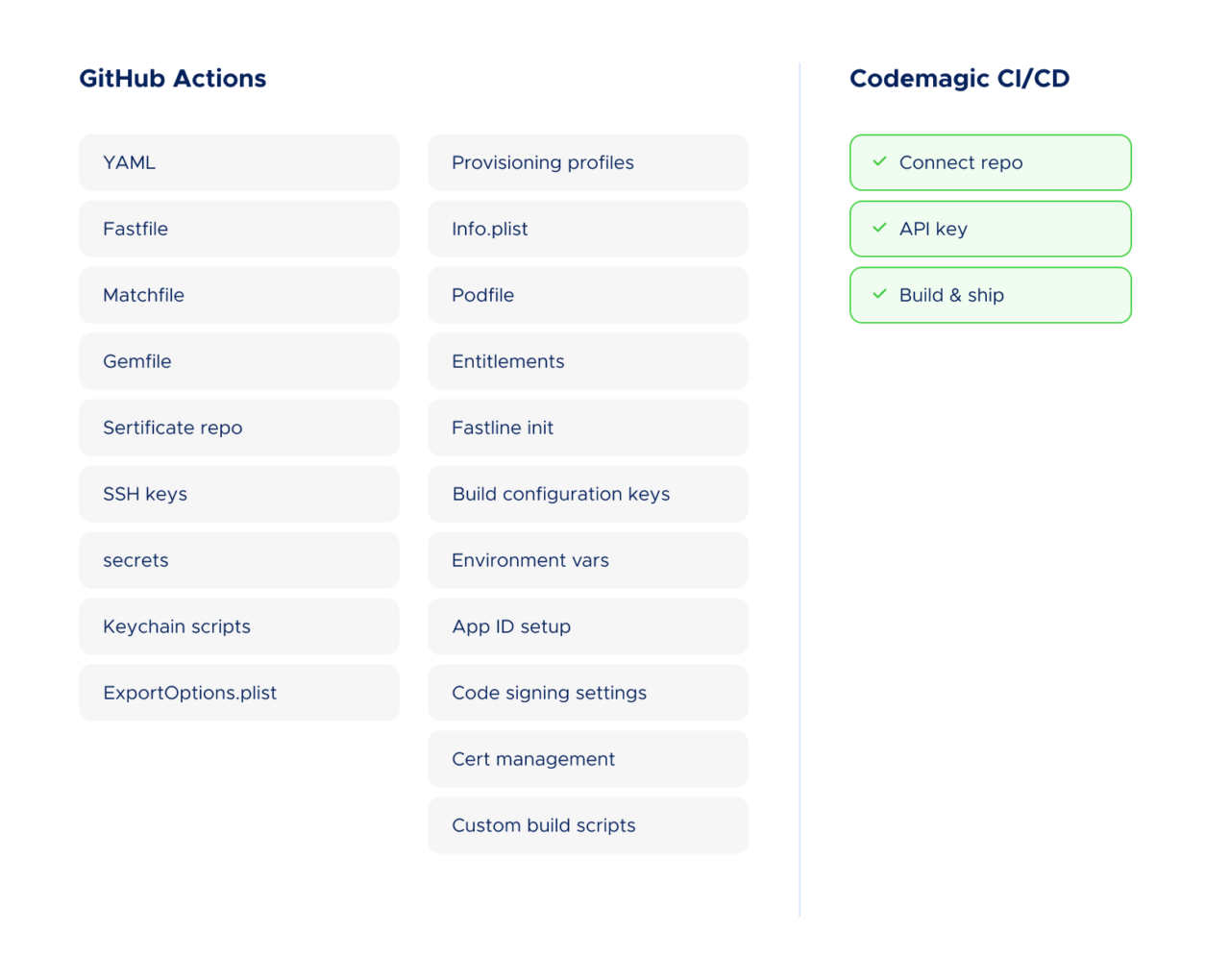
A YAML workflow file (50-150+ lines). Fastlane configuration files (Fastfile, Matchfile, Appfile, Gemfile). A separate private Git repository for certificates. A machine user or deploy key for certificate repo access. Five to eight repository secrets (API keys, certificate passwords, match passwords). Shell scripts for keychain management. An ExportOptions.plist. Xcode version pinning. Ruby environment setup for Fastlane.
This is for a single platform. If you’re building for both iOS and Android, double most of it.
We’re not listing this to be dramatic. Every item above is documented in tutorial after tutorial, each running 2,000-4,000 words, each with a comments section full of developers hitting edge cases the tutorial didn’t cover.
Compare this with Codemagic
On Codemagic, the equivalent setup looks like this:
- Connect your Git repository
- Select your project type (or let Codemagic detect it)
- Connect to App Store Connect using your API key. This enables Codemagic to fetch, manage, and renew certificates and provisioning profiles on your behalf, while you retain full control of the credentials
- Configure build, test, and publish steps in your
codemagic.yaml(Flutter projects can also use the visual Workflow Editor) - Publish directly to App Store Connect, TestFlight, Google Play, or Firebase App Distribution
No separate certificate repository. No Fastlane dependency (though you can use it if you want). No temporary keychain management. No base64 encoding. No machine users.
The typical setup time is about 30 minutes from sign-up to first build in App Store Connect. That number comes from actual user reviews on Product Hunt and G2. The reason it’s achievable is that Codemagic was built from day one for mobile, so the things that require “assembly” on a general-purpose platform are built-in defaults here.
The reliability problem: performance roulette
Even if you accept the complexity overhead and get your pipeline working perfectly, you’re still dependent on GitHub’s macOS runner infrastructure. And that infrastructure has documented, recurring reliability issues.
Chronic performance inconsistency
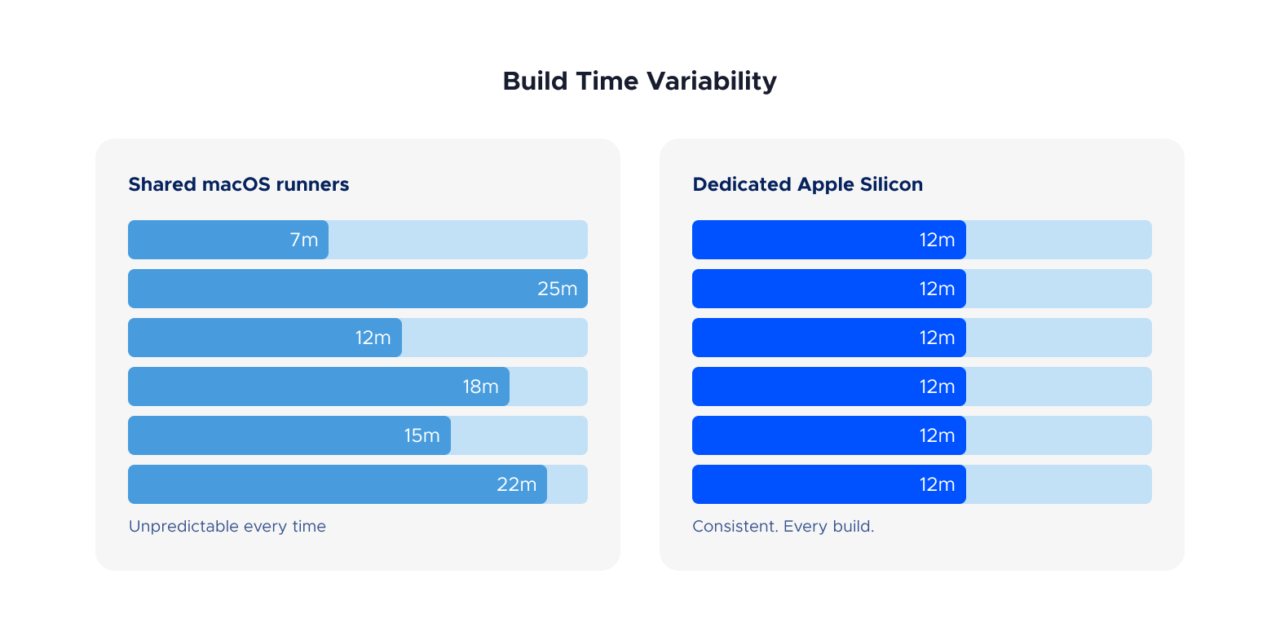
GitHub’s standard macOS runners use shared infrastructure. The performance you get depends on what else is running on the same host. This means build times for the exact same project can vary significantly between runs.
This isn’t speculation. The GitHub Issues repository for runner images contains a long history of performance complaints. One issue documents that 10-25% of macOS runs are noticeably slower, with identical workflows taking twice as long depending on which host the job lands on. Another reports a runner that could only compile 400 units in 5 hours, when it previously handled over 6,000 per hour.
Acute outages
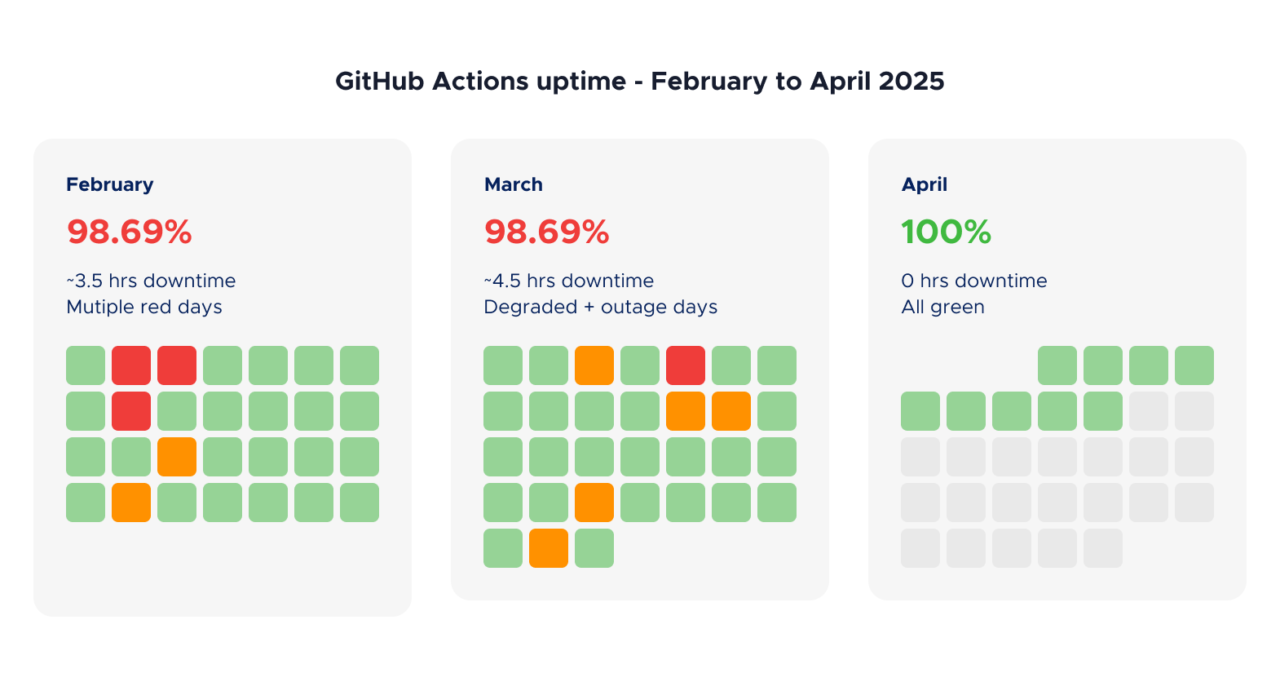
Beyond the day-to-day variability, there are periodic major incidents. In October 2025, GitHub Actions macOS runners experienced degraded performance for over 10 hours, with error rates peaking at 96%. Jobs timed out, queues backed up, and teams lost a full day of CI/CD capacity.
As recently as January 2026, developers reported that builds on the latest macOS runner images consistently exceeded 45 minutes and triggered pipeline timeouts, with the same builds completing normally on earlier runner versions.
These aren’t isolated events. They’re part of a recurring pattern where macOS runner performance degrades after image updates, takes weeks to stabilize, and then degrades again with the next update cycle.
Third-party runners help, but add another layer
Services like WarpBuild, Blacksmith, and Namespace offer faster macOS runners that plug into GitHub Actions as drop-in replacements. Some provide Apple Silicon hardware (M2 Pro, M4 Pro) that significantly outperforms GitHub’s standard runners. Pricing is often competitive or cheaper than GitHub’s rates.
These are legitimate products that solve the compute problem. If you’re committed to GitHub Actions and your main frustration is runner speed, a third-party runner service is a reasonable option.
But they don’t solve the complexity problem. You still need the YAML, the Fastlane configuration, the certificate management, the secrets, the keychain setup, and the store publishing scripts. You’ve traded one vendor for two (GitHub for orchestration, the runner provider for compute), which means two billing relationships, two support channels, and another integration to maintain.
There’s also a strategic question hanging over the third-party runner ecosystem. In December 2025, GitHub attempted to introduce a $0.002/minute “platform fee” for all GitHub Actions usage, including self-hosted and third-party runners. The backlash was immediate, and GitHub postponed the change within 24 hours. But the company explicitly framed this as a postponement, not a cancellation, and stated that the underlying economics haven’t changed. As one analysis noted, the question isn’t whether GitHub will try again, but when and in what form.
For teams evaluating their CI/CD stack, this creates a layer of pricing uncertainty that didn’t exist a year ago.
Codemagic’s approach to reliability
Codemagic runs builds on Apple Silicon machines, currently Mac mini M2 and M4 hardware. Each physical machine hosts two VMs, so you’re sharing with at most one other tenant rather than dozens on a heavily virtualized cloud host. The result is far more predictable performance. Your build times stay consistent from run to run, without the “performance lottery” that plagues shared runner infrastructure.
The speed difference: what the benchmarks show
We recently published a build speed benchmark comparing GitHub Actions, Bitrise, and Codemagic using the same open-source Flutter project (Medito, a production app with real-world complexity). All build logs are public and linked from the article.
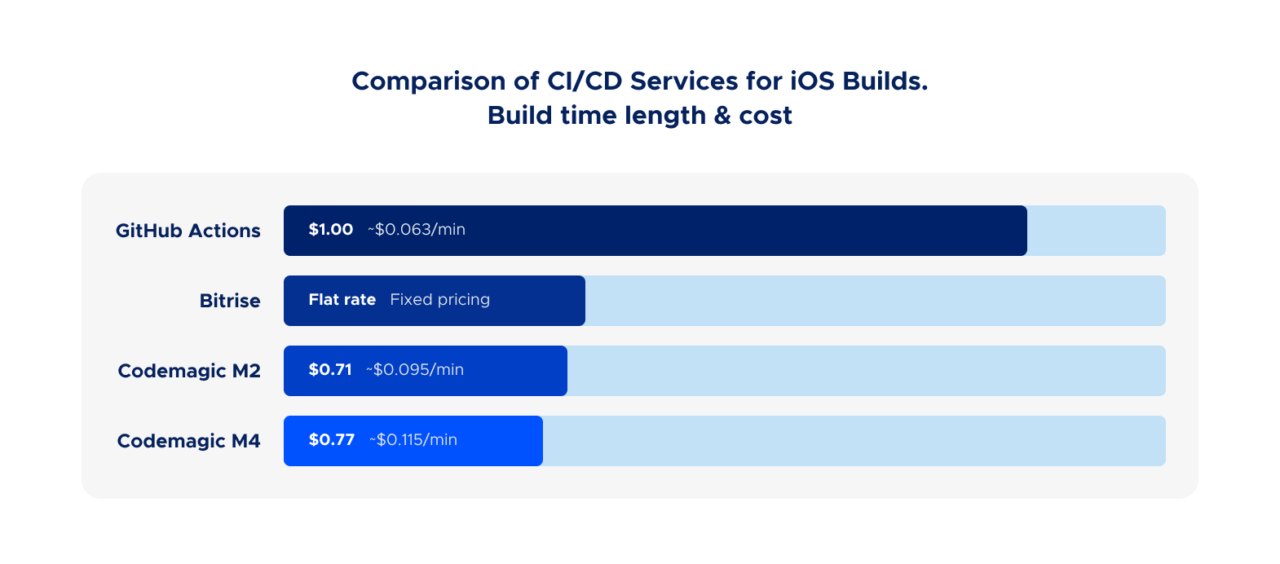
GitHub Actions’ standard macOS runner is roughly 2.4x slower than Codemagic’s M4 on the same project.
GitHub does offer larger runners with more powerful hardware, including machines with M2 Pro chips. But these come with significant caveats. Larger runners are only available on GitHub Team or Enterprise Cloud plans. Your plan’s free included minutes cannot be used for larger runners, and they’re always billed at per-minute rates, even for public repositories. So the moment you upgrade to faster hardware to get acceptable iOS build times, you lose the free tier advantage that makes GitHub Actions attractive in the first place.
And even with larger runners, you still need the entire Fastlane/YAML/secrets/keychain setup described above. Faster hardware doesn’t simplify the pipeline. It just makes it finish sooner.
If you use a third-party runner service with Apple Silicon, the speed gap narrows. But that’s actually the point. To get comparable speed on GitHub Actions, you need to either pay for larger runners (losing your free minutes) or add a third-party runner provider. To get code signing working, you need Fastlane. To get store publishing, you need another set of plugins. Each one is a reasonable individual choice. But the total stack (GitHub Actions + paid larger runners or third-party macOS runners + Fastlane match + certificate repo + store publishing actions) is a lot of moving parts for something that should just be your build pipeline.
📊 Want to verify the numbers? All build logs from the benchmark are public. Same Flutter project, three CI services, full transparency.
The total cost of ownership argument
When comparing CI/CD costs, most teams look at the per-minute rate. That’s understandable, but it’s only part of the picture.
Per-minute pricing and additional charges
On raw per-minute cost, GitHub Actions charges $0.062/min for standard macOS runners (after the January 2026 price reduction). Codemagic charges $0.095/min for M2 and $0.114/min for M4 (current pricing).
At first glance, GitHub looks cheaper per minute. But because builds on Codemagic’s hardware finish over twice as fast, the cost per build is comparable or lower:
| Service | Build time | Cost per build |
|---|---|---|
| GitHub Actions (standard) | 16 min 10 sec | ~$1.00 |
| Codemagic M2 | 7 min 28 sec | ~$0.71 |
| Codemagic M4 | 6 min 43 sec | ~$0.77 |
For teams running dozens of builds per day, the faster machines actually cost less despite the higher per-minute rate.
It’s also worth noting that GitHub Actions charges aren’t limited to runner minutes. Storage for artifacts and caches is billed separately, with included amounts that vary by plan (500 MB on Free, 2 GB on Team) and are shared with GitHub Packages. For mobile projects that produce large IPAs, APKs, or dSYM files as build artifacts, storage costs can quietly accumulate. And for private repositories, the 10x macOS minute multiplier still applies when consuming your plan’s free minutes, meaning a 20-minute iOS build eats 200 minutes from your quota.
Engineering time costs
The harder-to-quantify cost is engineering time. How much does your team spend on initial pipeline setup (typically days, not hours, when starting from scratch)? On debugging code signing failures that only reproduce on CI? On updating workflows when GitHub changes runner images or retires Xcode versions? On investigating why a build took 25 minutes instead of 12? On maintaining Fastlane configs, Ruby dependencies, and certificate repositories?
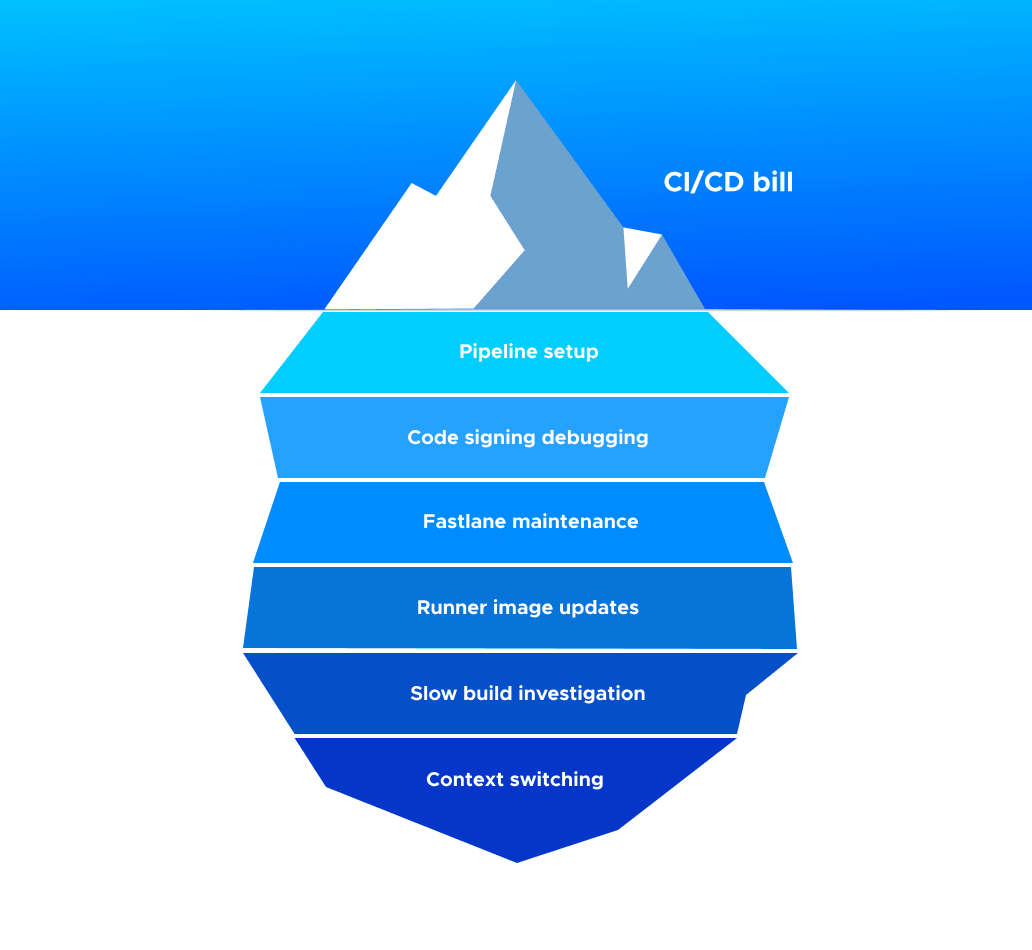
We can’t put a universal number on this because it varies by team. But the signal from developer communities is consistent: mobile CI/CD maintenance on general-purpose platforms is a recurring time sink that feels disproportionate to the value it delivers.
A Codemagic user on G2 put it simply: “Maintaining CI/CD pipeline is sometimes hard. Not with Codemagic; it makes us more productive, and we can focus on coding new things instead of babysitting our CI.”
That’s the real cost difference. Not cents per minute, but hours per week.
When GitHub Actions IS the right choice
We’d be dishonest if we didn’t acknowledge the cases where GitHub Actions makes sense for mobile teams:
You’re building an open-source app and your project is relatively small. Standard GitHub-hosted runner minutes are free and unlimited for public repositories. That’s genuinely generous. However, this free tier has constraints that start to matter as your project grows. Larger, faster runners aren’t free even for public repos, so if you outgrow the standard 3-core M1 runner, you start paying. And artifact storage is limited and shared with GitHub Packages, which can become a concern for projects producing large binaries across multiple build targets. For a small project, none of this matters. For a growing one with an active contributor base and a full CI matrix, it’s worth understanding what the free tier actually includes.
You already have deep GitHub Actions expertise on your team and your pipeline is stable. If it works and nobody’s spending time maintaining it, don’t fix what isn’t broken.
Your mobile builds are a small part of a larger monorepo pipeline. If you’re running web, backend, and mobile builds from the same repo and want one CI system, the convenience of staying in GitHub’s ecosystem has real value.
You have a dedicated DevOps or platform team that handles CI/CD for the whole company. The complexity we’ve described is manageable when someone’s job is to manage it.
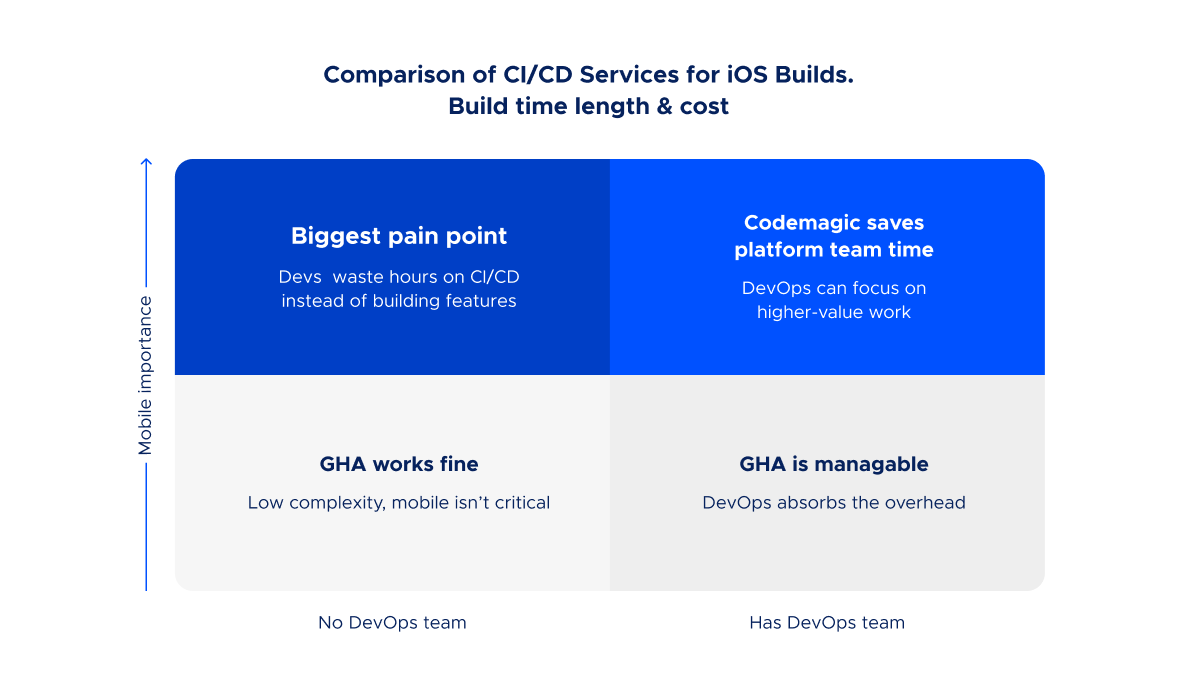
The teams we see switching to Codemagic are typically the ones without a dedicated platform team. Small-to-mid mobile teams of 2-20 developers where the iOS and Android developers themselves are responsible for CI/CD, and that responsibility has turned into a part-time job they didn’t sign up for.
The bottom line
GitHub Actions is a capable CI/CD platform that wasn’t designed for mobile. The evidence isn’t just our opinion. It’s in the Fastlane setup tutorials that run thousands of words long. In the GitHub Issues threads about macOS runner performance. In the community discussions full of developers debugging code signing for days. In the pricing incidents that revealed strategic uncertainty about the platform’s future cost structure.
You can make it work. Teams do, every day. But “making it work” takes Fastlane, a certificate repo, base64-encoded secrets, temporary keychains, third-party runner services, store publishing plugins, and ongoing maintenance across all of these.
Or you can use a platform that was built for mobile from day one, where code signing is handled automatically, builds run on Apple Silicon, and publishing to stores is a built-in feature rather than an afterthought.
🚀 Ready to stop fighting your CI? Get 500 free build minutes a month. No credit card. Most teams have their first build in App Store Connect within 30 minutes.
Build speed benchmarks referenced in this article use the open-source Medito app and include public build logs for full transparency. Pricing information reflects rates at the time of writing; please check each service’s website for the latest. Competitor feature comparisons should be verified against current documentation before making purchasing decisions.